.svg)


If you are unsure how to choose a mobile app development company, start with five checks: relevant work, the people doing the job, the build plan, total cost, and support after launch. Send each company the same brief, check its claims, and compare what you will receive.
Two proposals can look close at first. Both may promise a simple app, a fast launch and regular updates. Yet one may include design, testing, and a working backend, while the other covers only the screens.
The steps below will help you spot those gaps. You will learn what to check, what proof to request, and which questions to ask before you commit.
How to Choose a Mobile App Development Company: 10 Steps
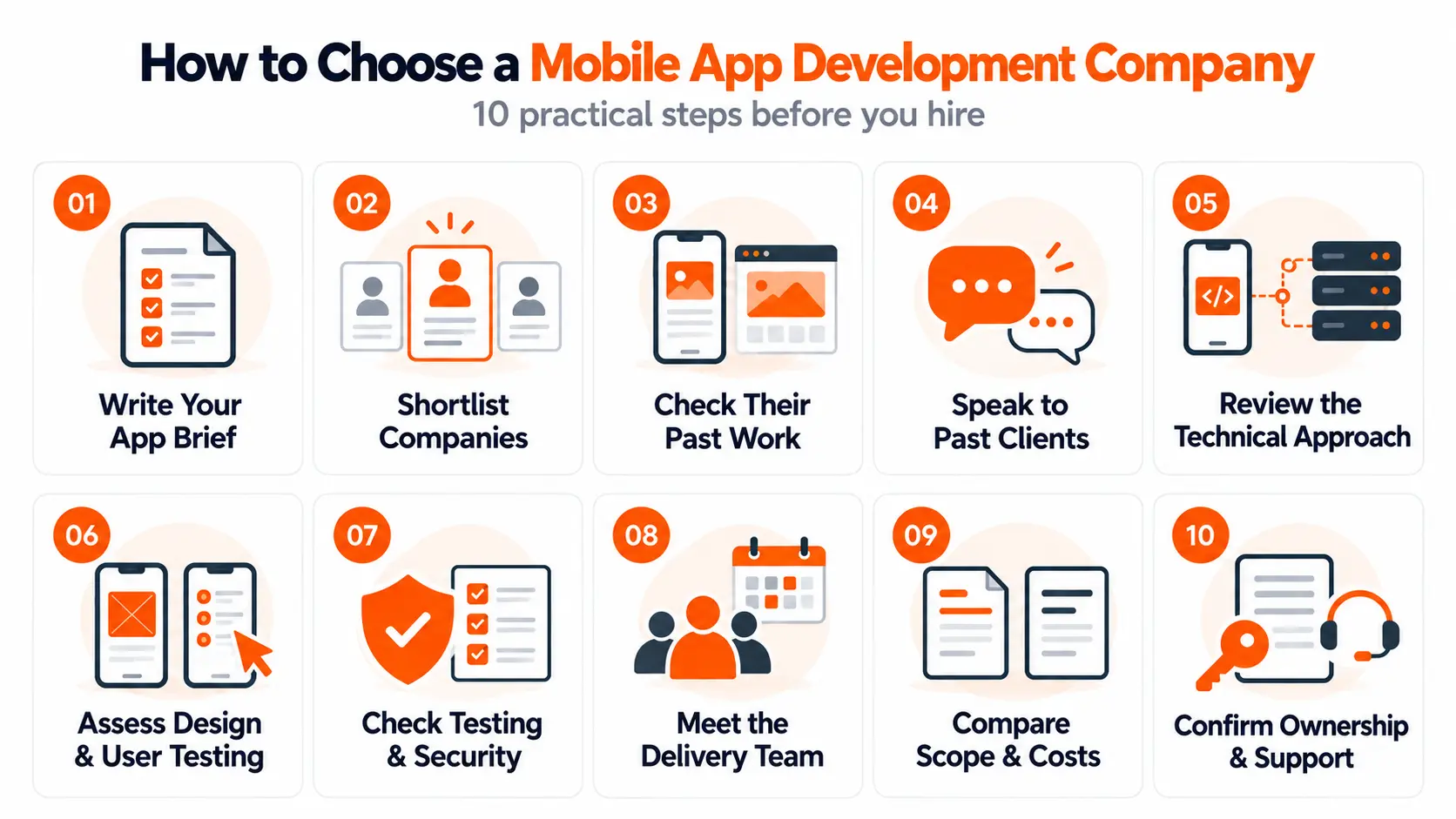
Start with your own needs, then use the same checks for each team. Keep a note of their answers. A clear written reply, a useful demo, or a past client’s feedback gives you something solid to compare.
1. Write a Clear App Brief
A useful brief can fit on one page. Explain who will use the app, the task they need to complete, and why it matters to your business.
For example, a home repair firm may need customers to book visits, pay, and receive reminders. Its office team may also need to change bookings. These details tell a developer much more than “we need a booking app”.
Include:
- Your users and their main problem.
- The features needed for the first version.
- Whether you need iOS, Android or both.
- Your budget range and target launch date.
- Any existing tools the app must connect to.
Share sketches or an early prototype if you have them. You can use mobile app prototyping tools to show a flow that is hard to explain in words.
You do not need every answer yet. Mark uncertain points clearly so each company can explain how it would resolve them. Choose one useful goal, such as fewer missed bookings, to guide the first build.
Ask: “What would you keep in the first version, and what would you leave for later?”
2. Make a Shortlist of Suitable Companies
Start with recommendations from other business owners, relevant searches, and business review sites. A shortlist of three to five companies is a practical place to begin.
Look for teams that fit your project size, budget, and needs. Check whether they offer the work you require. Some focus on design, while others also handle development, testing and support.
Check basic business details too. The name on the proposal, the website, and the contract should be clear and consistent. Find out where the delivery team works and when it can start.
Review scores and awards can help you find options. Follow them up by looking at the work behind them. A long client list tells you little about who built each app or which team members are still available.
Send the same brief to every company. This gives each one a fair chance to explain its approach and makes the replies easier to compare.
Ask: “Have you handled projects with a similar budget, size, and scope?”
3. Check Apps They Have Actually Built
Choose two or three relevant projects from each portfolio. Where possible, download the apps and try their main tasks. Book a service, search for an item, or go through the sign-up flow.
Notice whether the steps are clear and whether errors are easy to fix. Then ask the company what part of the project it delivered. It may have designed the screens, built one feature, or managed the whole product.
Look for experience with the problems your app must solve. A team that has built secure payment flows may have useful skills even if its past clients work in a different industry.
Also check what stage the work has reached. A concept shows design thinking. A prototype lets people test an idea. A launched app provides evidence of a working product. Each has value, but they prove different things.
For example, the Zyra digital banking app concept can illustrate mobile design choices. It should be assessed as a concept.
Some business apps are private. In that case, ask for an approved demo or a case study with sensitive details removed.
Ask: “Can you show a similar app and explain exactly what your team delivered?”
4. Speak to Past Clients
Once a company looks suitable, ask whether you can speak to one or two past clients. Try to find projects close to yours in size or complexity.
A short call can reveal how the team works when a project becomes difficult. Useful questions include:
- Did you know what was included before work began?
- How did the team explain delays or extra costs?
- Could you review progress during the build?
- What happened when you reported a problem?
- Would you work with the company again?
Read public reviews alongside these answers. Look for specific details about the project, delivery, and support. A broad statement such as “great team” offers less context than a clear account of how an issue was solved.
Client privacy may limit what a company can share. Ask what other evidence it can provide, such as an approved reference or a project walkthrough. Assess the evidence together.
Ask: “What went wrong during the project, and how did the team deal with it?”
5. Ask How They Would Build Your App
You should be able to understand the proposed approach without knowing how to code. Ask the team to explain its choice in plain English.
Native development uses tools made for a particular platform, such as iOS or Android. Cross-platform development lets teams share parts of the code across platforms. The right choice depends on your features, budget, device needs, and plans.
Discuss the work behind the screens too. Your app may need a backend: the part that stores data, handles accounts, and runs business rules. It may also need links to payments, maps, or existing business tools.
Use a real example from your brief. If customers pay in the app, ask what happens when a payment fails or the connection drops. The team should explain how it would handle that case.
Find out what growth would mean for the proposed setup. Ask which parts may need more work as users, data, or features increase, and who will maintain them.
Ask: “Why does this approach suit our app, and what are its limits?”
6. Review Their Design and User Testing Process
A clear design process helps the team check whether people can use the app before too much is built.
Ask how it learns about your users. Will it speak to customers, review an existing product or test early screens? The amount of research should suit the project and the questions that need answers.
Good UI/UX design makes key tasks easy to follow. Review a sample user flow and a clickable prototype. Look at how the team handles forms, errors, loading screens, and empty pages.
For a booking app, a useful test might ask someone to choose a service, pick a time, and change the booking. Watch where they pause or need help.
Check accessibility as well. Text should be readable, buttons easy to use, and important actions clear. Ask how the team plans for people who use assistive tools, such as screen readers.
Request an example of feedback that changed a design. This helps you see how the company learns from testing and applies what it finds.
Ask: “Can you show a design change you made after testing it with users?”
7. Check Their Testing and Security Plan
Ask for a sample test plan or a report with private details removed. It should show what is checked, who checks it, and how problems are tracked.
The plan should cover the devices and operating systems your users need. It should also include situations such as slow internet, failed payments, and a user closing the app halfway through a task.
Agree on what must work before you accept the build. For example, a booking should be saved once, the correct amount should be charged, and a failed payment should show a clear next step.
For security, discuss login, user permissions, and sensitive data. Ask how the team prevents one customer from seeing another customer’s records. Find out whether security testing includes the backend as well as the mobile app.
The OWASP Mobile Application Security Verification Standard offers checks for areas such as data storage, login, and network connections. Ask which checks apply to your app and how the team will test them.
Set performance goals around your users, devices, and main tasks. Have the team explain how it will measure those goals.
Ask: “What must pass before you consider our app ready to launch?”
8. Meet the Team and Agree on Updates
Meet the people expected to lead the work before you sign. Learn who handles design, development, testing, and day-to-day questions.
If the company uses freelancers or another firm for part of the build, clarify their role. Ask who reviews their work and who stays responsible for delivery.
Agree on a simple update routine. This might include a weekly call, a shared task list, and a working demo at each agreed stage. Confirm how much input the team needs from you and how quickly you should review work.
For teams in different time zones, set an overlap for calls and urgent issues. Also ask what happens if the main developer is away or leaves the project.
A sample progress report can help. Look for completed work, upcoming tasks, open questions, and risks to the schedule. During early calls, notice whether the team listens, explains trade-offs, and follows up on promises.
Ask: “Who will work on our app, and how will we see progress each week?”
9. Compare Quotes for the Same Scope
Read each proposal against your original brief. Check that it covers the same features, platforms, and level of support.
A lower quote may leave out the backend, admin tools, or testing. Another may include these but charge separately for launch support. Write down those gaps before comparing totals.
Request a breakdown covering:
- Planning, design, and development.
- Backend work and links to other systems.
- Testing, fixes, and app store submission.
- Hosting, paid tools, and ongoing support.
- Assumptions, exclusions, and possible extra charges.
Make sure the quotes use the same currency and state whether taxes are included. For a first release, compare MVP development costs against the actual features and work proposed.
Understand how you will pay. A fixed-price agreement sets a price for defined work. Time and materials means paying for work done, so you need regular cost tracking. A dedicated team arrangement reserves agreed team capacity, often with a recurring charge. It needs clear priorities and a way to measure progress.
Check the payment stages and how each stage is accepted. Ask who approves extra work and how you will receive a revised cost before it starts.
The launch plan should also show time for your feedback, testing, and store review. Record which dates depend on decisions or approvals outside the team’s control.
Ask: “What is excluded from this quote, and what could increase the total cost?”
10. Agree on Ownership, Handover and Support
Before signing, get a written list of what you will own, what you can access, and what will be handed over. These are separate points.
Cover the custom source code, design files, business data and project documents. Clarify when ownership transfers and which parts use third-party licences or the supplier’s existing tools.
Plan account access early. Your business should retain control of key accounts where possible, including hosting and app store accounts. Give the development team the access it needs to do its work.
For iOS, Apple’s enrolment guidance explains the requirements for individual and organisation accounts, including who can enrol an organisation. Set up the right arrangement before submission becomes urgent.
Agree on launch and ongoing support:
- Who handles store submissions and changes requested during review?
- Which bugs are covered by the initial fix period?
- What maintenance costs extra?
- Who handles operating system updates and security fixes?
- When is support available, and how quickly will someone respond?
A response target is the time to acknowledge a problem. A fix target is the time to resolve it. Clarify both for serious issues.
Finally, discuss how another team could take over. Ask about documents, access, data export, and any handover fees. Good records help your business keep using the app if the working relationship ends.
Ask: “If we change partners later, what will we receive and what will it cost?”
Compare Your Final Shortlist Side by Side
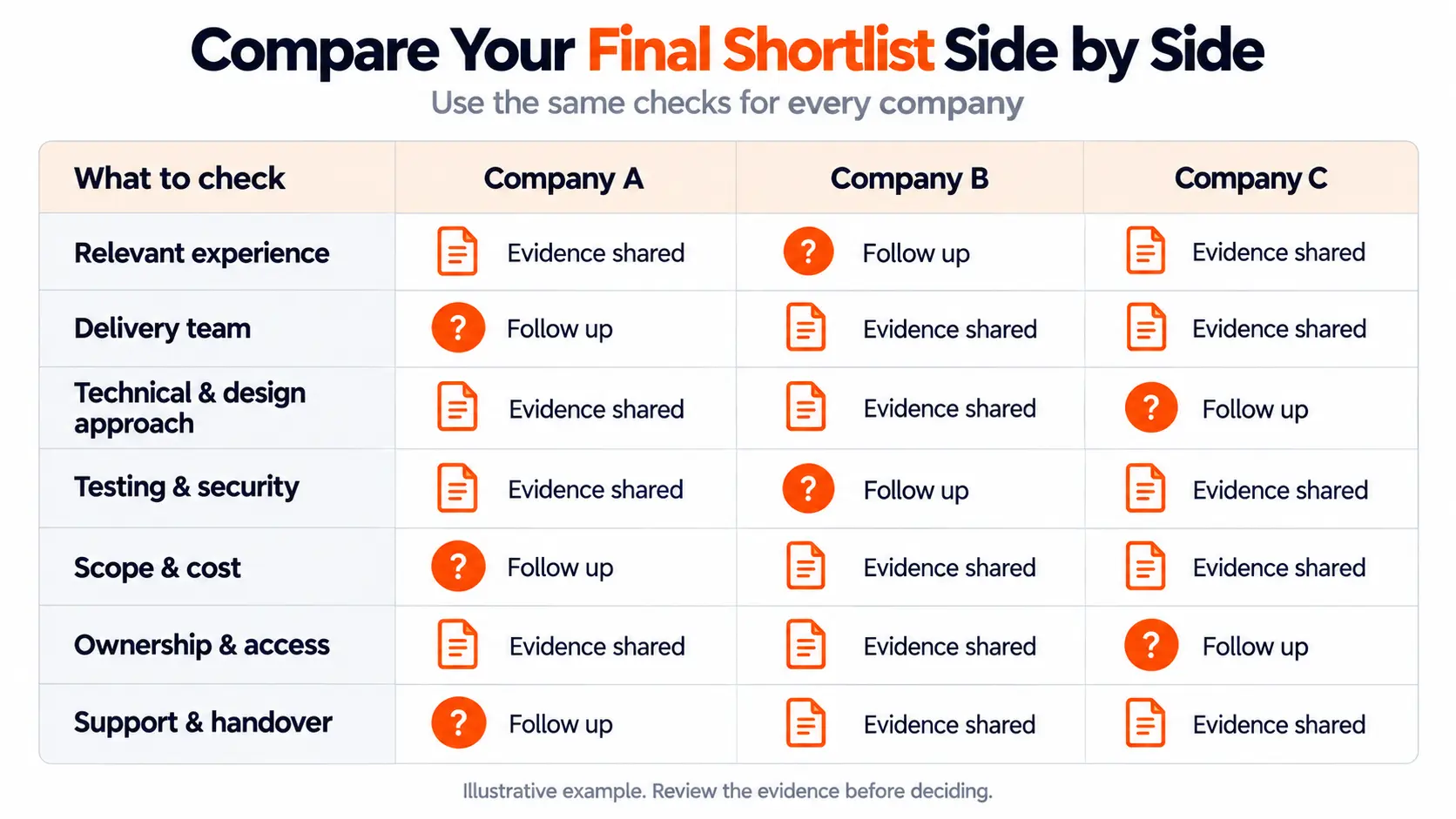
After the calls, put each company’s answers in one sheet. Record the evidence behind each claim and mark anything that still needs an answer.
Use these checks as your rows, then add a column for each company:
Decide which needs are essential before choosing. If your app must work offline, a proposal with no clear offline plan needs more discussion. A strong score elsewhere does not answer that gap.
If two teams still look close, request a focused follow-up on the main uncertainty. Ask each to explain the same difficult feature. Their answers can help you judge both their thinking and how well you could work together.
Warning Signs to Check Before You Sign
These signs need a clear answer before you move forward:
- Claims you cannot check. The company shows app screens but cannot explain its role or provide another suitable form of proof.
- Firm promises with little detail. It gives a fixed date and price before discussing the features, systems, and decisions involved.
- An unclear delivery team. You cannot find out who will lead the work or who is responsible for quality.
- Gaps in the quote. Important work appears in sales calls but is missing from the written scope or cost breakdown.
- Unclear ownership or access. The company avoids explaining what you receive, which accounts you control or how a handover works.
- Vague testing and support. There is no clear plan for checking the build, fixing faults or handling issues after launch.
Put your concerns in writing and ask for a specific reply. A team that explains a limit clearly gives you something you can assess. An unanswered concern should remain open when you make your final choice.
Frequently Asked Questions
Should I Hire a Freelancer or an App Development Company?
A freelancer can suit a focused task or a small project when you can manage the other work. A company may provide design, development, testing, and support together. Check the people and skills assigned to your project, their availability, and backup cover. The best fit depends on the work required and how much you can manage yourself.
Do I Need a Local App Development Company?
A local company can help when you need in-person workshops or close knowledge of your market. Remote teams can also work well with agreed hours and clear updates. When comparing mobile app development in the UK, check where the delivery team works and who supports you. A local address alone does not answer those questions.
Can I Choose a Company Without a Technical Background?
Yes. Start with a clear brief, try relevant apps, and ask for plain explanations of the proposed approach. Speak to past clients and compare written scope, cost, and support. For a complex or sensitive app, an independent technical reviewer can help assess the proposal. Agree on their review scope and fee before you hire them.
Should I Pay for a Discovery Phase Before Development?
Paid discovery can help when important features, user needs or technical questions are still unclear. Agree on the outputs first. These may include user flows, a prototype, technical findings, and a revised estimate. Check that you can use the findings with another supplier. Discovery should leave you with useful work and clearer choices, even if you do not continue.
Choose a Team You Can Work With Beyond Launch
Choose a company that understands your app, shows relevant work and makes its responsibilities clear. Compare the full scope, meet the delivery team and settle ownership and support before signing.
Keep the first build focused and agree on how you will judge its quality. That gives both sides a clear starting point.
Brightin Studio’s mobile app development services can help turn your brief into a practical plan for design, development and launch.