.svg)


Blue stands out in research on the most popular colours. In results published by YouGov in 2015, it came first in all ten markets surveyed. Green, red and purple also proved popular, though their positions varied by place.
But your favourite colour may change with what you are choosing. You might love a red coat, prefer a green room and want a simple white website.
This guide looks at the survey findings, ten familiar colours and the ideas they can suggest. It also explains how to choose colours that suit your brand and help people use your website.
What Is the Most Popular Colour in the World?
Blue is a well-supported answer, based on the ten-market YouGov survey published in 2015. However, that study gives us a picture of those places at that time. It does not establish a permanent favourite for everyone worldwide.
The results also show why a single global top-ten list can be misleading. Blue led across the survey, but the next favourite was not the same everywhere.
These examples come from the YouGov international colour results, published in 2015.
It also helps to be clear about what “popular” means. A favourite-colour survey asks what people like. It does not tell us which colour appears most in homes, clothes, logos or apps.
Someone may choose purple as their favourite but buy a black phone. A business owner may love orange but decide that green fits their product better.
For design work, colour surveys offer a useful starting point. The final choice still needs to suit the thing you are making and the people who will use it.
Popular Colours and Their Meanings
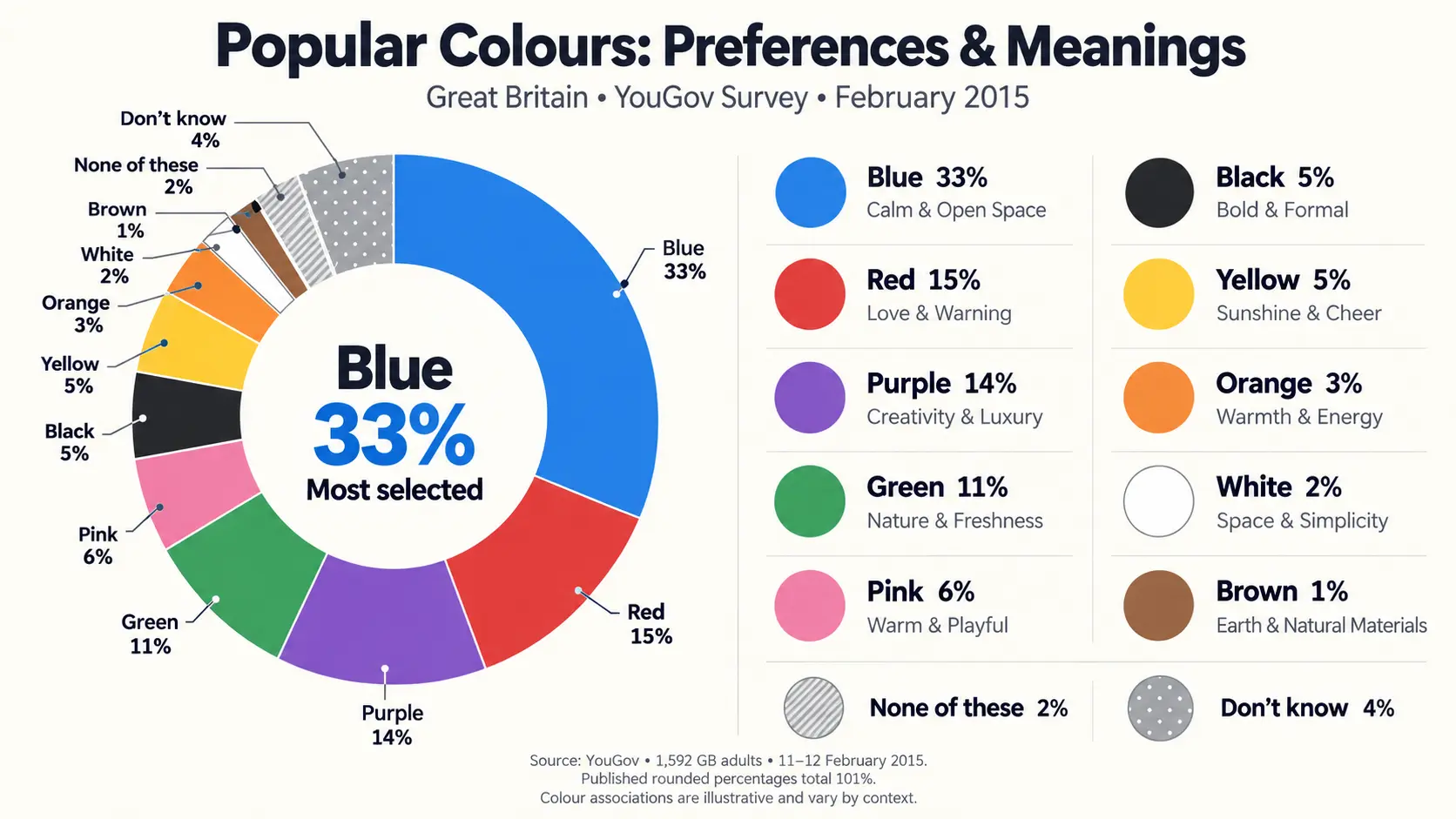
Below are ten familiar colours, with examples of how they can work in everyday life and design. They are not listed as a proven worldwide ranking.
Colour meanings also depend on the setting. The same red can suggest love on a card and danger on a warning sign. Think of these meanings as possible associations, rather than fixed rules.
Blue
Blue brings to mind the sky, sea and open space. In a design, a soft blue can give a quiet feel, while a bright blue can look lively.
Navy blue offers another direction. Paired with white and clear type, it can create a formal look for a business website or report. A travel page might use a lighter blue alongside beach photos.
The shade matters as much as the colour name. A pale blue background and a dark blue button serve very different purposes.
Blue is also easy to build a small colour set around. You could pair it with white, grey or a warm accent such as coral. Test the actual shades together, especially where text sits on top of a coloured area.
Green
Green has a clear link with leaves, grass and plants. That makes it a useful starting point for designs about gardens, outdoor spaces or food grown from the land.
Yet green can look very different from one design to another. Soft sage can suit a quiet homeware page. Deep forest green can give packaging a rich look. Bright lime can add energy to a sports poster.
For a gardening website, you could use a dark green heading, a pale background and photos of real plants. This gives the colour a clear reason to be there.
A green logo alone cannot show that a business cares for the environment. Any claims about waste, materials or sourcing still need facts behind them.
Red
Red can suggest love, heat, action or danger. Its meaning becomes clearer when you see the words, pictures and objects around it.
A red heart on a greeting card has a different role from a red error message. Both use the same colour family, but they tell very different stories.
In a layout with mainly pale colours, a small red detail can stand out. You might use it for a heading, a label, or one key action. If every part is bright red, those details lose their difference.
Shade changes the feel, too. A deep wine red can suit a formal invitation, while a bright tomato red may fit a playful food brand. Neither choice guarantees that people will buy more.
Purple
Purple can suggest creativity, imagination or a sense of luxury. It offers a wide range of looks, from soft lilac to deep plum.
A lilac background could suit a gentle, light design. Dark purple with cream could work for a theatre programme or gift box. A bold violet might be useful for an art event.
The surrounding details help decide the result. Purple beside neat type and plenty of space looks different from purple beside playful shapes and large letters.
You can also use it as a small accent. For example, a mostly neutral website could use purple for selected tabs or key buttons. Give it a clear job and keep that job the same across the site.
Black
Black is useful when you want strong contrast, simple shapes or a bold look. It can support a formal style, but it can also feel rough, playful or dramatic.
Think of black text on a white book cover. The result depends on the type, spacing, and picture as much as the colour itself.
For a photography website, a dark background could help frame bright images. For a page with long blocks of text, you would need to check how comfortable the full layout is to read.
Black does not have to mean pure black everywhere. Charcoal and other dark greys give you more options. Check each shade with the text, borders, and buttons that sit beside it.
White
White gives other parts of a design room to show. It can provide a clear background for text, photos and products.
On a shop page, white space around an item can help separate it from nearby products. On a blog, space between paragraphs can make the page easier to scan.
The term “white space” also means space in a layout. That space can be any colour.
A white design still needs care. Pale grey text may be hard to read, and a white form field may disappear against a white page without a clear border.
Warmer shades, such as ivory or cream, offer a different look. These can work well with brown, muted green, or natural materials in photos.
Pink
Pink can be soft, warm, bold, or playful. A pale blush and a bright hot pink may share a name, but they give you very different design options.
For example, pale pink could form the background of a flower shop page. Hot pink could add a strong accent to a music event poster.
It is too limiting to treat pink as a colour for only one gender or age group. The people using your product, and the way you use the shade, matter more than that label.
Try pink with different partners before deciding. With cream, it can look gentle. With black, it can appear much bolder. With red or orange, it can create a warm, colourful design.
Yellow
Yellow brings to mind sunlight, lemons and bright flowers. It can add a cheerful note to a design, though the shade and setting will shape the effect.
A small yellow label on a dark page can be easy to notice. A whole page of bright yellow needs more careful handling, especially when there is a lot to read.
Pale yellow text on white is a poor starting point for clear reading. A darker text colour may work better, but you should still check the contrast.
Mustard, gold and soft butter yellow give you further options. A café menu could use mustard with dark brown, while a children’s poster might use a brighter yellow with large shapes and clear labels.
Orange
Orange sits between red and yellow. It can bring warmth to a design without using either of those colours directly.
Bright orange could suit a sports graphic or a playful app. A softer terracotta can work with cream, brown and photos of natural materials.
Imagine a pottery shop website with an off-white background, dark text and small terracotta details. The colour supports the product photos without taking over the page.
Orange can also be used for a button that needs to stand apart from its surroundings. Whether it works depends on the rest of the screen and the clarity of the label.
There is no single button colour that works best for every website. Test orange as part of the whole page.
Brown
Brown connects easily with wood, earth, leather, coffee and chocolate. Those links give it a clear place in many designs.
A coffee bag could use dark brown with cream. A furniture website might use lighter brown tones alongside wood photos. In both cases, the colour relates to something people can see.
Brown also offers more range than it first seems. Tan can look light and warm, while a deep chocolate shade can create strong contrast.
If a brown design feels too flat, try changing the spacing, photos or supporting colours. You may only need a lighter background or one small accent. The way you combine the parts often matters more than the main colour on its own.
Why Do People Prefer Different Colours?
People bring their own memories, habits and surroundings to colour choices. A favourite colour can have a personal story behind it, even when someone finds that story hard to explain.
Culture and Personal Experience
A colour might remind you of your home, a family celebration or the kit worn by your favourite team. Another person may connect that same colour with something else.
Research involving 4,598 people across 30 nations found shared patterns in colour and emotion, alongside differences linked to language and place. This supports taking local context into account when designing for different audiences. Study published in Psychological Science.
For a business, that means asking people what a design suggests to them. Their answers may be more useful than a chart that gives every colour one fixed meaning.
Shade, Brightness and Context
“Green” can mean pale mint, deep olive or bright lime. Someone who dislikes one may love another.
The size of a coloured area changes the effect, too. A bright yellow cushion is a small detail. Four bright yellow walls are a much larger part of the room.
The same applies to a screen. A bold accent can work well on a small icon but feel too strong behind a full article. Always look at a colour in the place where you plan to use it.
Age and Changing Preferences
Your choices can change as your life changes. New interests, places and experiences may introduce colours you had not considered before.
However, age alone cannot tell you what a person will like. People in the same age group can have very different tastes.
If you are designing for a group, speak to people within it. Show them real examples and ask what feels clear, suitable, or out of place.
How to Choose Colours for Your Brand or Website
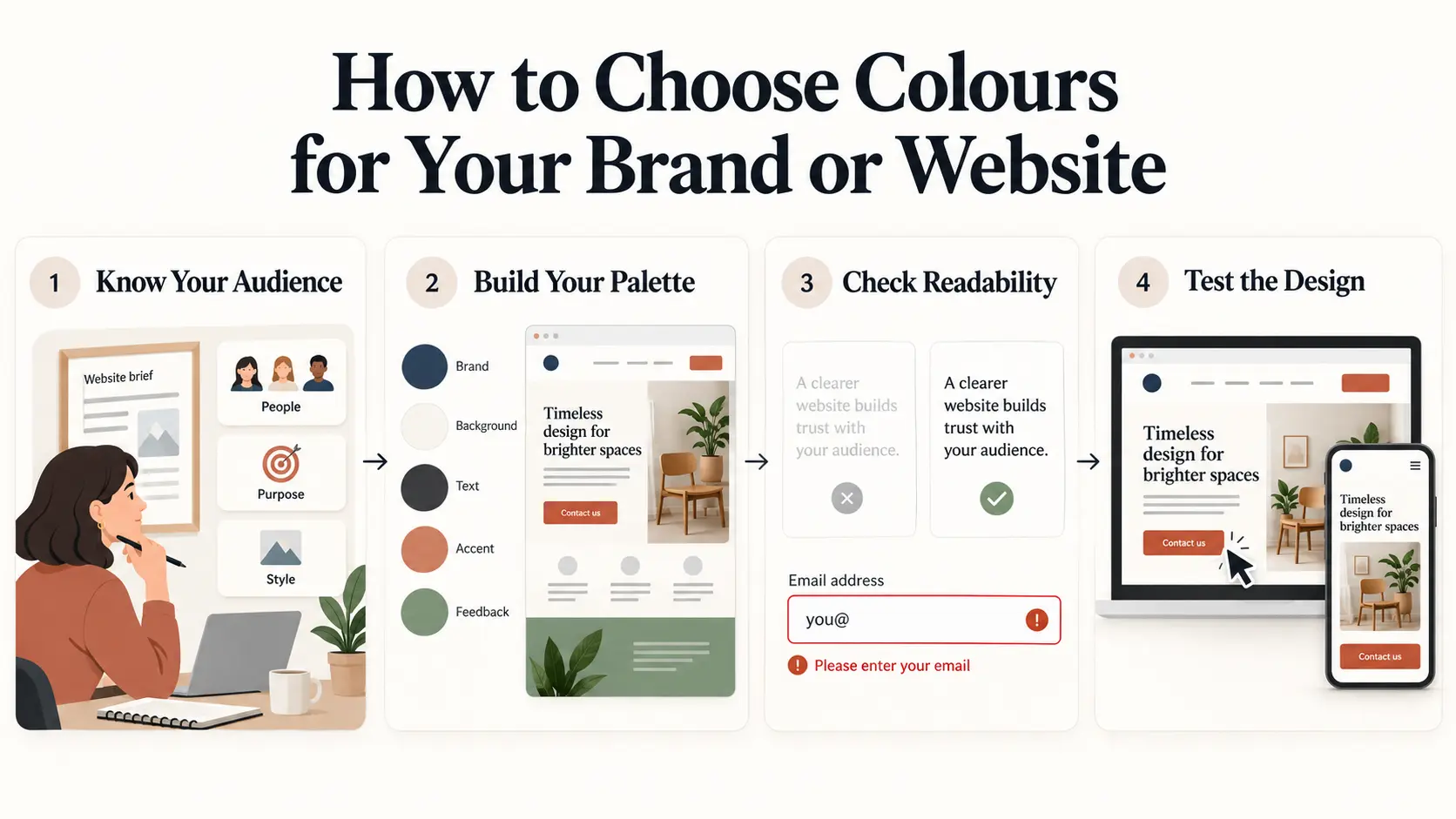
A popular colour is useful only if it works for your design. Start with the purpose of the page, then build a small set of colours around it.
Start With Your Audience and Purpose
Write down what your website needs to help people do. They may need to read a guide, compare products, book a service, or complete a payment.
Next, think about the kind of look that suits the business. A quiet, simple layout may suit one brand. Another may need a bright and playful style.
Choose two or three words to guide the design, such as “warm”, “clear” and “friendly”. Use these words to review your options.
Looking at competitors can help you understand the setting. You can then make a choice that fits your business while giving it a look of its own.
Build a Small, Consistent Palette
A palette is simply the set of colours you use together. Give each colour a clear purpose.
A practical starting set might include:
- A main colour for key brand details.
- A background colour.
- A dark colour for text.
- An accent for important actions.
- Colours for messages such as errors and success.
You do not need to give every section a new colour. Reusing the same colours helps keep pages consistent.
For example, if your main action buttons are dark blue, keep that pattern across the site. Save a separate treatment for actions such as deleting an account, where people need a clear warning.
Check Readability and Accessibility
People need to read the page and understand what to do. Good contrast helps text remain clear against its background.
For WCAG Level AA, most normal text needs a contrast ratio of at least 4.5:1. Large text needs at least 3:1. A contrast checker can test your chosen text and background colours. W3C text contrast guidance.
Also, use words or symbols alongside colour when giving information. An error message should explain the problem rather than only turn a field red. This helps people who cannot easily tell the colours apart. W3C guidance on using colour.
Test Colours in the Actual Design
Put your palette into a real page before you approve it. Include headings, photos, buttons, links and a form.
Check it on a phone as well as a larger screen. Ask a few people to complete a task, such as finding a price or sending an enquiry.
Watch where they pause. A button may blend into the background, or a pale label may be hard to read. Those findings give you specific things to improve.
Colour planning is part of a wider design process. Brightin Studio’s UI/UX design services bring colours, layouts and user tasks together in screens that teams can review and test.
Frequently Asked Questions
What Is the Second-Most Popular Colour?
It depends on the place and survey. In YouGov’s results published in 2015, green came second in the United States and China. Red came second in Great Britain and Germany, while purple took that place in Hong Kong.
Is Marrs Green the World’s Favourite Colour?
Marrs Green was the result of GF Smith’s 2017 World’s Favourite Colour project. It is a shade between blue and green.
That project used a different approach from surveys asking people to choose named colours. Its result should be understood within that project, rather than as proof that everyone prefers the same shade.
What Is the Least Popular Colour?
There is no single answer that applies everywhere. The result depends on the people asked, the available choices and whether the question asks for a favourite or a least favourite.
A colour that few people name as their favourite can still work well in a home, product or website.
Is the Colour of the Year the Most Popular Colour?
A “Colour of the Year” title does not, by itself, show that a colour won a public preference survey. Check who selected it and how they made the choice.
A trend choice can inspire a design, but it does not need to replace a colour set that already suits your brand.