.svg)


Microservices best practices help teams build services that can change, grow, and recover safely. Start with clear service boundaries and data ownership. Then agree on how services talk, protect access, test failures, and release changes on their own.
An app can have ten small services yet need one large release for every change. Splitting the code alone does not make services independent.
In web application development, these links affect how safely teams can release changes.
On this page
- What are microservices?
- When to use them
- 15 best practices
- Order and payment example
- Launch checklist
- FAQs
What Are Microservices?
Microservices are separate services that work together to form an application. Each handles a clear business task and can be built and released on its own.
An online shop might have services for orders, payments, and stock. They share information through APIs or messages. An API is an agreed way for software to exchange requests and responses.
The word “micro” does not mean every service must be tiny. A useful service has a clear purpose, owns its work, and limits how much it needs to change alongside others.
When Should You Use Microservices?
For web design and development projects, microservices may help when complex features need separate releases or face different levels of demand. They also add work: more network calls, releases, alerts, and failure points.
During MVP development, a modular monolith often keeps the first build easier to manage. When building a SaaS product, separate a service once there is a clear need. Start with one part, measure the result, and keep a recovery plan.
15 Microservices Best Practices for Web Applications
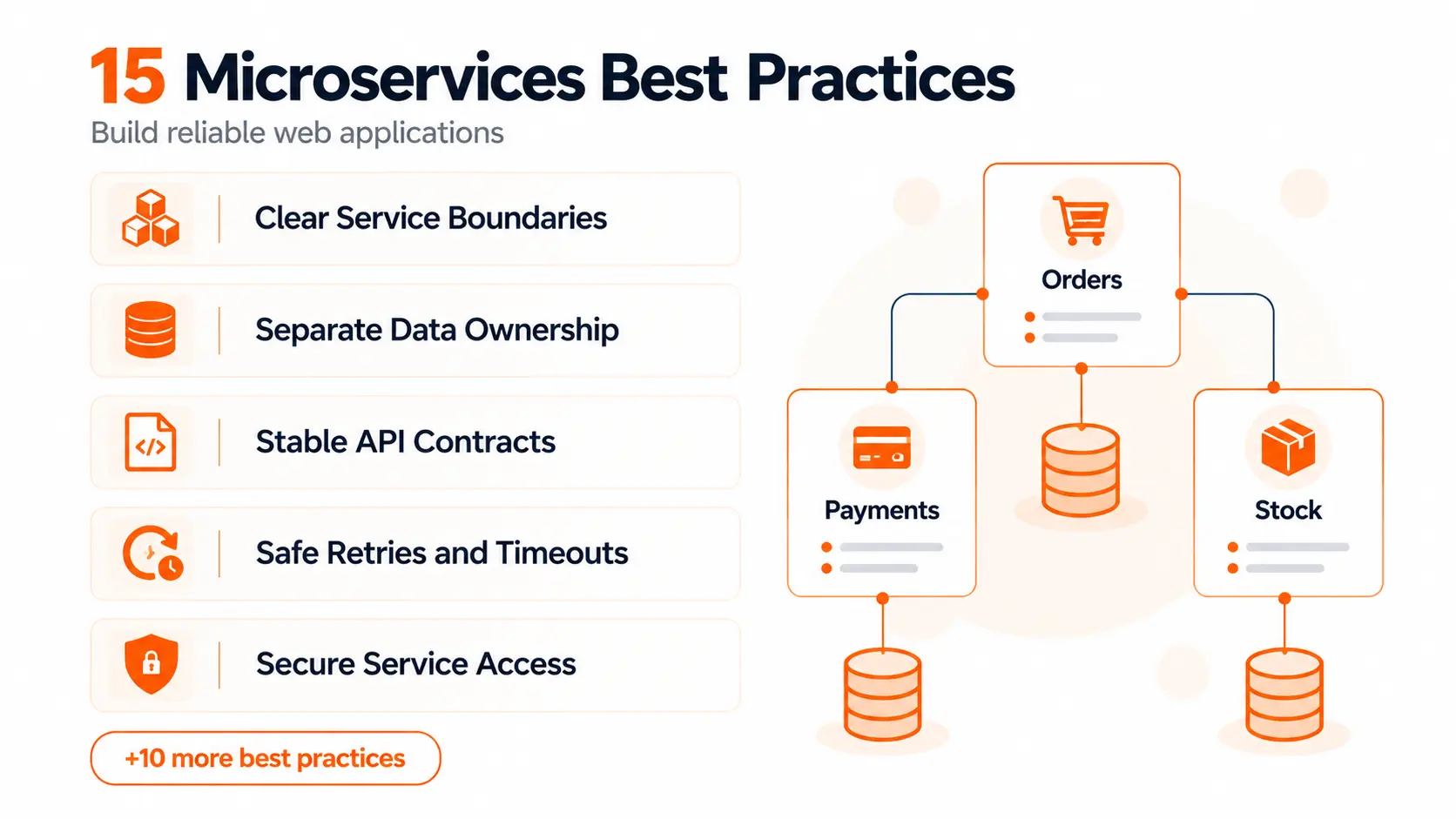
Start with the design of each service, then work through communication, testing, and daily operations. Use the following checks to review a new system or find weak points in an existing one.
1. Define Services Around Business Capabilities
Build a service around a business task, such as billing or stock control. Avoid making a separate service for every screen, table, or small function.
Domain-driven design helps teams map software to how the business works. A bounded context is an area where the same terms and rules apply. For example, “customer” may mean something different to billing and support teams.
Talk to people who do the work. List the rules, data, and changes that belong together. These give you a stronger starting point than the size of the code.
An order service could own rules for order creation, status, and cancellation. It would ask the payment service to handle charges.
Review the boundary when two services need constant calls or joint releases. They may belong together. Keeping related work in one place can remove needless network traffic and team handovers.
2. Give Each Service Ownership of Its Data
Choose one service to own each set of business data. Other services should request that information through an API or receive agreed updates through events.
For example, the order service should not change rows in the payment service's tables. Otherwise, a change to those tables could break both services.
Separate ownership does not always need separate physical database servers. Services can use the same server while keeping their tables, access rights, and schemas separate. A schema defines how data is organised. Microsoft's guidance on microservices data ownership explains this distinction.
Shared hardware still creates shared capacity and outage risks. Decide whether those risks suit the product.
A reporting service may keep a copy of selected data. Make clear which service owns the original records and how fresh the copy needs to be.
3. Define Clear API and Event Contracts
A contract sets out what a service accepts and returns. It should cover field names, data types, required values, errors, and the meaning of each event.
An event reports something that happened, such as an order being placed.
Keep the contract separate from the database layout. Clients should not need to know how you store records.
Small changes can still break another service. Adding an optional field is often safe. Removing a field that another team uses is not.
Document examples and test changes against current consumers. For a breaking change, agree a migration period before removing the old version.
Keep error responses clear too. A client needs to know whether to correct the request, sign in again, or retry later. A vague error makes safe recovery much harder.
4. Choose Between Direct Calls and Asynchronous Messages
Use a direct call when the caller needs an answer before it can continue. Looking up an order's current status is one example.
Use asynchronous messages when the work can happen later. Sending a receipt should not force the customer to wait while the email system responds.
REST APIs are common for request and response work. gRPC can suit calls between services that need strict contracts. Queues and event streams support background work and updates.
Messaging adds its own needs, including failed-message handling, duplicate checks and queue monitoring.
Keep direct call chains short. If one request must pass through six services, each step adds delay and another possible failure.
For queued work, show an honest status such as “processing”. Tell the user when the task is complete instead of implying that sending a message means the work has finished.
5. Plan How Data Stays Consistent Across Services
When services own separate data, an update may take time to reach them all. This is called eventual consistency. A sales report may tolerate a short delay; a payment decision may need stricter checks.
Agree where delays are safe and which records drive each decision.
A common problem occurs when a service saves an order but fails before sending its event. The order exists, yet other services never hear about it.
An outbox pattern can help. Save the change and an event record in one local database transaction, so both succeed, or neither does. A separate worker sends the recorded event. Consumers must still handle duplicates safely.
For work across several services, plan recovery steps. If a payment fails after stock is reserved, release the stock. This type of workflow is often called a saga.
Record progress and failed recovery steps. Some cases will need staff review rather than endless automatic retries.
6. Make Repeated Requests Safe with Idempotency
A request can reach a service even when its response never reaches the caller. The caller may then try again. Without a safeguard, the same action could happen twice.
Idempotency means repeating an operation has the same intended effect as doing it once.
In fintech software development, each payment attempt should have a unique idempotency key. Reuse that key when retrying the same attempt. Do not create a new key for each retry.
The payment service records the key and outcome, then returns the saved result for repeat requests. It should also reject reuse of a key with conflicting details.
Make duplicate checks safe when requests arrive at the same time. A check followed by an unprotected write can still allow duplicates.
Apply the same care to incoming events. Track processed event IDs and keep that record consistent with the business change.
7. Set Timeouts and Prevent Cascading Failures
Set a limit on how long each remote call can wait. Choose it from measured response times and the time available for the full task.
Retry only suitable failures, with a clear limit. Backoff increases the wait between attempts. Jitter adds a small random delay, so many clients do not retry at once.
AWS explains how timeouts, retries, and backoff with jitter help handle short failures without overloading a struggling service.
A circuit breaker pauses calls to a service that keeps failing. Separate connection or worker limits can also stop one slow dependency from using all available resources.
Plan useful fallbacks. An order page might show that tracking is temporarily unavailable while keeping order details visible. Never display a successful payment without confirmation.
Avoid retries at every layer, which can multiply traffic. A timeout means the caller stopped waiting; it does not prove the remote action failed. Pair retries with idempotency.
8. Keep the API Gateway Focused
An API gateway can provide one entry point for client requests. It can route traffic, apply rate limits and handle common checks before a request reaches a service.
Keep pricing rules, order decisions and other business logic inside the relevant services. Otherwise, the gateway can become another large app that every team must change.
Internal calls do not all need to pass through this public gateway. Choose routes that fit your network and access controls.
Plan for gateway failures too. Monitor it, provide enough capacity and avoid making one running instance the only route into the application.
9. Secure Every Service and Data Request
Authentication checks who is making a request. Authorisation checks what that person or service may do. Both matter when requests pass through several services.
Use trusted identities for users and services. Protect network traffic with encryption and give each service only the access it needs.
A gateway can check a user's identity. The service handling a record must still enforce the relevant access rules. A valid login does not grant access to every account.
In real estate software development, a tenant should only access their own lease and payment records. Check these permissions on the server. Do not trust a tenant or property ID simply because it came from the browser.
Keep secrets out of source code and logs. Use a secrets manager and plan how credentials will be changed safely.
Test denied access as well as allowed access. Include requests for another customer's records, expired credentials, and calls from services without permission.
10. Test Contracts, Integrations and Failure Cases
Test each service's rules with fast unit tests. Then test its connections to databases, queues and other dependencies.
Contract tests check whether a provider and its consumers still agree on requests and responses. These help catch changes that work locally but break another team.
Keep end-to-end tests for key user journeys, such as placing an order or changing a subscription. They are useful, but a large suite can be slow and hard to diagnose.
Include difficult cases:
- A dependency responds too slowly.
- The same event arrives twice.
- Events arrive in a different order.
- A database connection drops.
- A user asks for another customer's data.
Run controlled failure tests in a safe environment. Check that the app recovers and that alerts reach the right person. Passing the normal flow is only part of being ready for live users.
11. Build and Deploy Each Service Independently
Each service should have an automated path from a code change to a tested release. This is the role of continuous integration and continuous delivery, or CI/CD.
Build one release package and promote that same package through test and live environments. Keep settings outside it so each environment can use the right values.
Use gradual rollouts where they help. Send a small share of traffic to the new version, watch errors and response times, then expand the release.
Database changes need equal care. Add new fields before code depends on them. Remove old fields only after all affected versions have stopped using them.
Keep a rollback plan, but check its limits. Older code may not work with changed data.
If changing billing means releasing every service together, review the shared contracts and dependencies. Independent releases should be possible in practice, not just shown on an architecture diagram.
12. Connect Logs, Metrics and Traces
Logs record events. Metrics show counts and trends. Traces follow a request across services. Together, they help explain what failed and where to look.
Pass a trace ID between services, including through messages where possible. Use consistent log fields so the team can find related events quickly.
Track error rates, response times, queue delays and failed business tasks. A running server does not prove that customers can complete checkout.
Set reliability targets around user needs. For example, track the share of valid checkout attempts that complete within the agreed time.
Send alerts that call for action. Include the service name, the affected task and a link to recovery steps.
Avoid logging passwords, payment details or unnecessary personal data. Keep retention and access rules clear.
13. Use Health Checks and Scale from Real Demand
A readiness check asks whether an instance can accept traffic. A liveness check asks whether it needs restarting. Keep these purposes separate to avoid needless restarts during a dependency outage.
Let running requests finish during shutdown where possible. Allow enough start-up time before judging a new instance unhealthy.
Scale from measured demand, such as queue depth or request load. Check database capacity before adding more workers. More workers can make an overloaded database worse.
Store durable data outside temporary instances so replacement instances can continue the work.
Caching can reduce repeat reads. With AWS API Gateway caching, choose suitable responses and cache keys. Set clear expiry rules and prevent one customer's cached data from reaching another. Avoid caching data whose freshness is critical to a decision.
14. Choose Infrastructure Your Team Can Manage
Containers package code and its dependencies for a consistent runtime. Managed container services can take care of much of the hosting work. Serverless services can also suit some workloads.
Kubernetes is an option when its controls match your needs and your team can support it. It is not a requirement for microservices.
Compare the work involved in updates, scaling, networking, backups and incident response. Include monitoring and support time when reviewing costs.
Keep infrastructure settings in version control where practical. Use repeatable setup steps.
Start with the simplest platform that meets your needs. Revisit the choice when measured limits appear, and test how to restore data and recover from an outage.
15. Set Clear Ownership and Shared Standards
Every service needs a named owner. The team should know who maintains it, approves changes and responds when it fails.
Keep a short service record with its purpose, APIs, dependencies, alerts, and recovery steps. Update it when the service changes.
Agree shared rules for security, logging, testing, and releases. Teams can still choose tools where there is a clear reason, but each extra language or framework adds maintenance work.
Before adding a service, confirm who will support it after launch and how other teams will use it safely.
Microservices Best Practices in Action: An Order and Payment Example
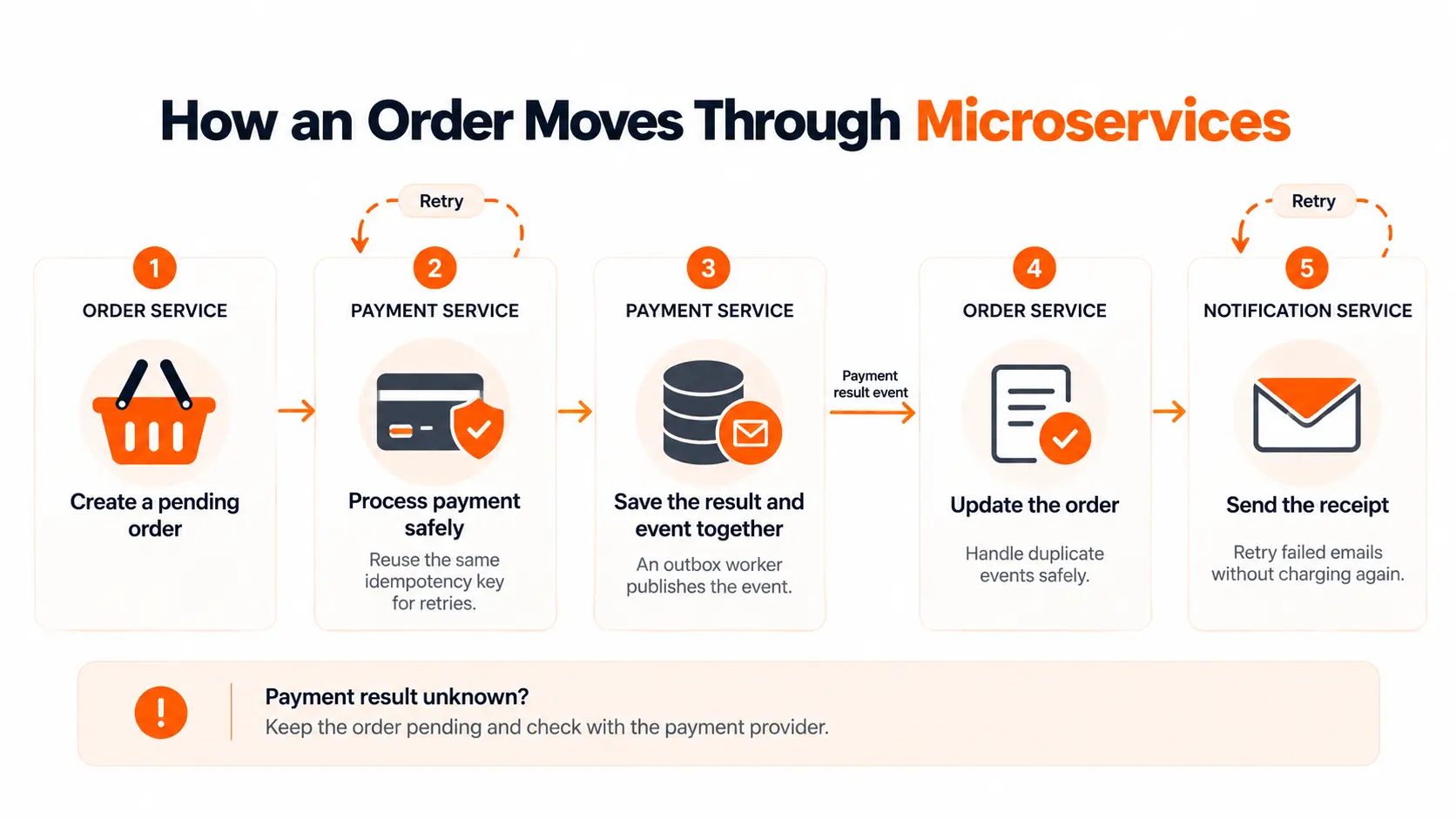
Consider a simple online shop. Its order, payment, and notification services have separate roles.
- Create the order. The order service saves it as pending and records the work needed to request payment.
- Process payment safely. The payment service uses the same idempotency key if it must retry the request to the payment provider.
- Record the confirmed result. The payment service saves the result and an outbox event in one local transaction. A worker publishes that event.
- Update the order. The order service handles the event safely, even if it arrives more than once.
- Send the receipt. The notification service sends an email. If email delivery fails, it retries that task without charging the customer again.
If the payment outcome is unknown, keep the order pending and check the provider's result. Do not assume that a lost response means no charge occurred. A shared trace ID helps the team follow the full journey.
Microservices Checklist Before You Go Live
Use these questions during a release review:
- Can each service be deployed without a full system release?
- Does every data set have a clear owner?
- Do current consumers still work with new API and event versions?
- Are timeouts set and retries limited?
- Can duplicate requests cause a second charge or order?
- Are user, service, and customer access rules tested?
- Can the team trace failed requests and delayed messages?
- Have key dependency failures been tested?
- Are backups, recovery steps and service owners clear?
Resolve gaps that could lose data, expose records, or block core tasks before launch.
Conclusion
Microservices work well when each service has a clear purpose, owns its data, and can be released safely. Start with the parts your team can manage. Test how services handle failures, keep access secure, and track real user journeys. Add more services only when they solve a clear problem. Keep the system simple enough to maintain as your product grows.
Frequently Asked Questions
How Small Should a Microservice Be?
There is no fixed code size. Keep the business rules that change together within a clear boundary. A service should be manageable by its owning team. Constant calls and joint releases may be signs that two services should be combined.
Can Microservices Share a Database Server?
Yes. Services can share physical infrastructure while keeping their data and access separate. Sharing tables or changing another service's records creates tighter dependencies. Shared servers also share resource limits and outage risks, which you need to assess.
Do Microservices Need Kubernetes?
No. You can run them on managed container platforms, serverless services, or virtual machines. Choose a setup your team can release, monitor, and recover safely. Kubernetes is useful where its features justify the work of running it.
Does Every Service Need a Different Programming Language?
No. A shared language can make hiring, support, and tooling easier. Choose another language when it solves a clear problem, and the team can maintain it. The freedom to use different tools does not make variety a goal.
Do Microservices Need Separate Git Repositories?
No. Several services can live in one repository and still have separate builds and releases. What matters is whether teams can change and deploy each service safely. Repository layout alone does not make services independent.