.svg)


The top SDLC methodologies help teams plan, build, and improve software. Each gives the work a different shape. Some suit a fixed plan. Others leave more room to learn from users and change course.
Think about a staff tool with clear rules. Now think about a new app whose users have yet to try it. Both need good code and testing, but the same work plan may not suit both.
This guide explains eight approaches, where they fit and what to watch for. You will also learn how to choose a process for your team, budget, and goals.
The examples below explain how a method could work. They are not Brightin client case studies.
What Are SDLC Methodologies?
SDLC means Software Development Life Cycle. It covers the work that turns an idea into software and keeps it useful after launch. A methodology is a way to organise that work.
Most projects include the stages below. Teams may group or name them in different ways, as AWS explains in its SDLC guide.
These stages can overlap. Testing can start with a review of the plan. Design may change after users try an early version.
The terms also differ. Waterfall and Spiral are lifecycle models. Scrum is an Agile framework. Kanban helps manage workflow. DevOps supports how teams build, release, and run software. They can work together.
Why Does a Software Project Need a Clear Method?
A clear method helps people agree on what to do, who will do it, and how to check it. It also gives new requests a place in the plan.
Keep the Scope Clear
Scope means the work included in a project. “Build a booking app” is too broad on its own. Can users cancel? Can staff move a booking? Can two people book the same slot?
These details affect cost and time. A clear process helps you settle them and decide what can wait until later.
Agree What Done Means
A screen that looks finished may still need testing. For a payment task, “done” might include checks for failed payments, clear error messages, and a record of the result.
Shared quality rules help the team judge progress. They also help you see what is ready to use.
Find Unknowns Early
An old system may not share data as expected. Users may struggle with a planned task. An early test can reveal either problem before the team builds too much around it.
Top SDLC Methodologies at a Glance
Use this table to compare the main purpose of each approach. The best fit still depends on your project.
1. Waterfall: Follow a Clear Plan
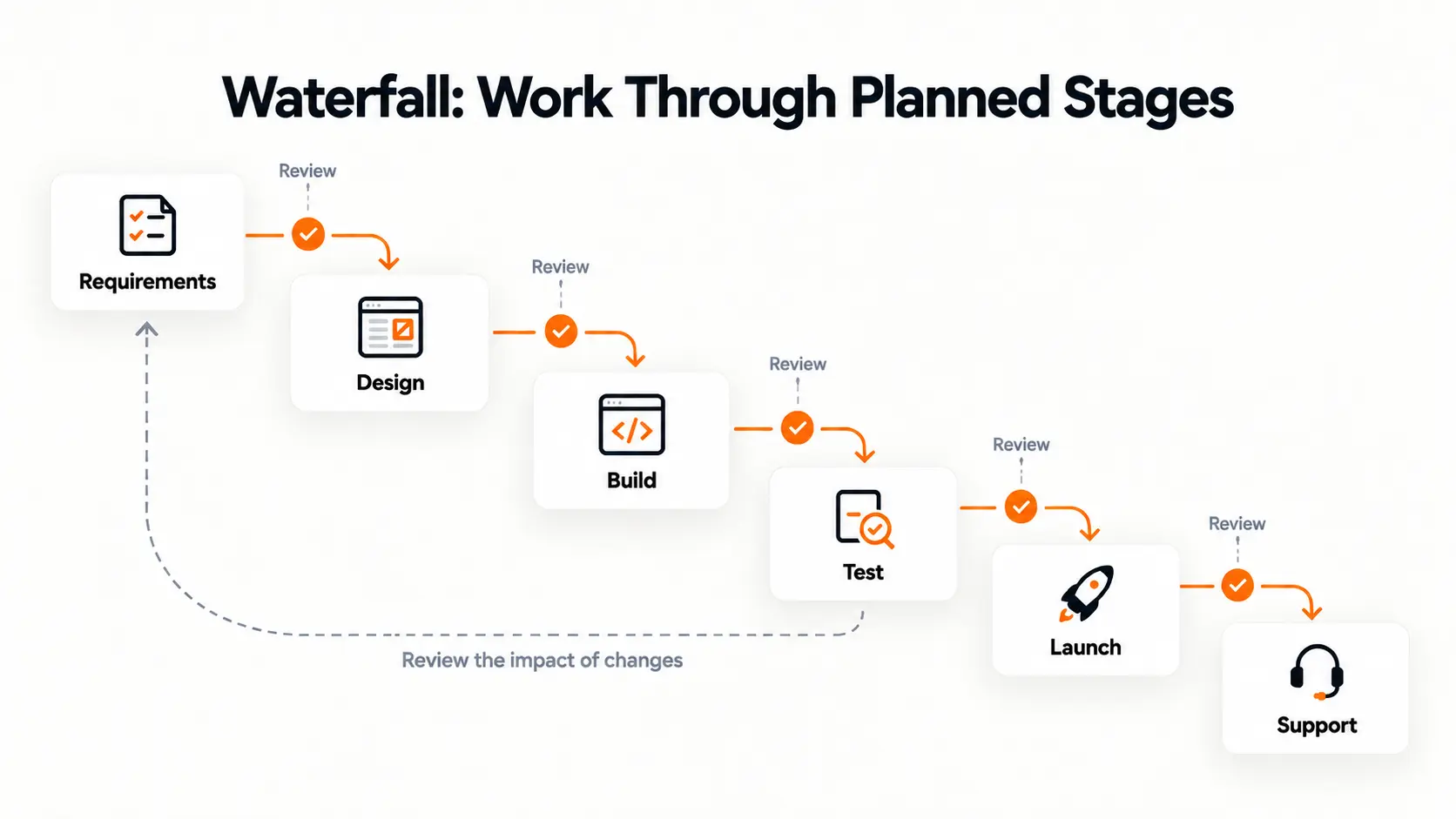
Waterfall moves through planned stages. The team agrees on the needs, designs the product, builds it, tests it, and prepares for launch. Reviews help decide when to move on.
This model suits work that is well understood. Its staged flow works with clear requirements.
How It Works
Before the main build, the team records the user roles, business rules and key tasks. The design then gives developers a shared plan.
Changes are possible. However, a change to an agreed rule may affect the design, code and tests. The team should review that effect before giving a new price or date.
Where It Fits
Picture a firm replacing a staff expenses tool. Its payment rules and approval steps are settled. It wants the same process on clearer screens.
A staged plan may suit this project. If staff disagree about the rules, the firm needs to resolve that first.
Strengths and Limits
Waterfall offers clear review points and a defined scope. This can help people approve work and track what is left.
The main risk is late feedback. A tool may meet the written plan yet still feel hard to use. Let users try a screen prototype before the full build.
A fixed plan also cannot promise a fixed cost if the needs change. Agree on how extra work will be assessed.
2. V-Model: Plan the Tests Early
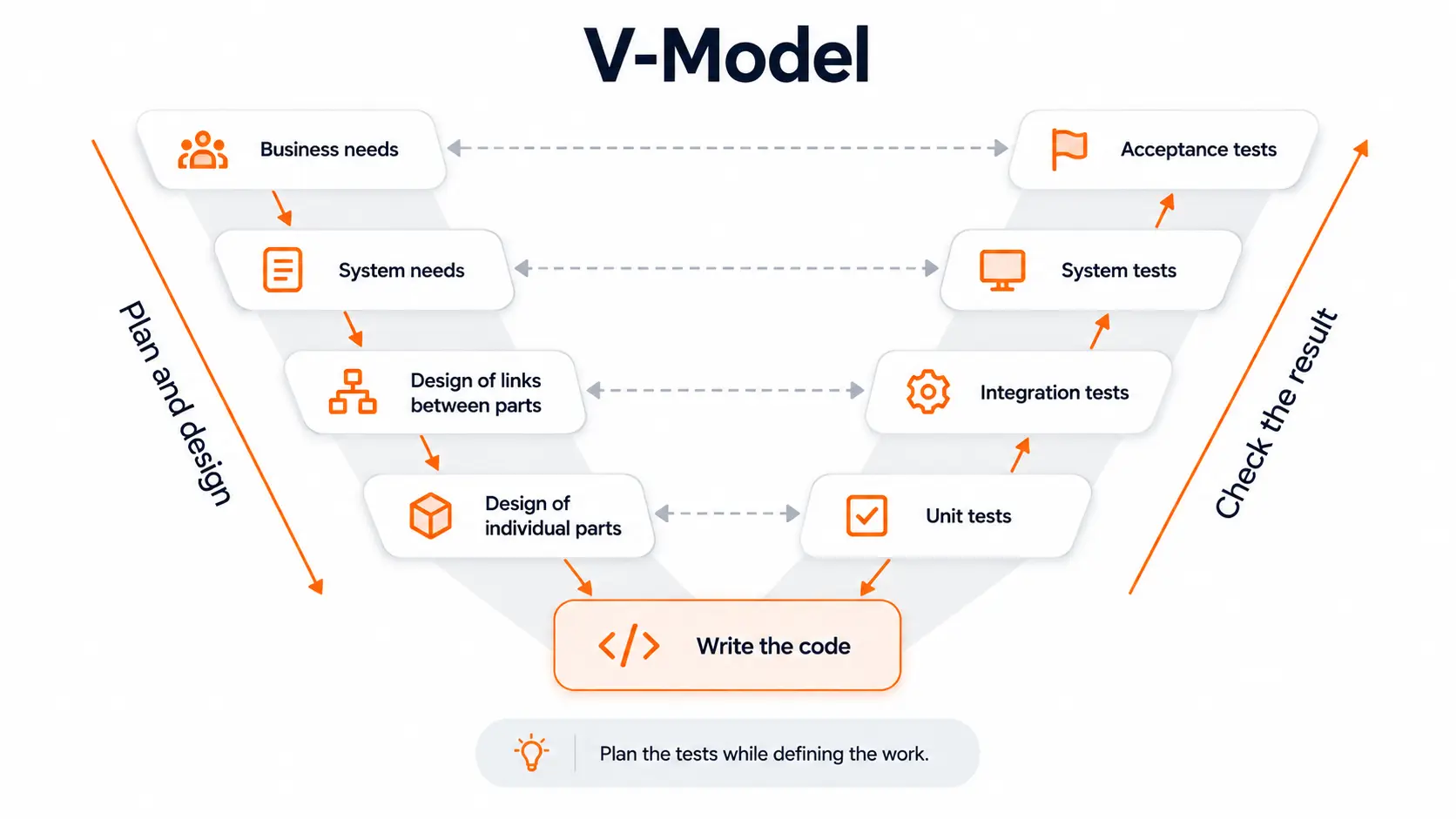
The V-Model links each level of planning and design to a matching level of testing. It aims to make the checks clear while the team decides what to build.
How It Works
Business needs guide acceptance tests. System needs guide system tests. The design of links between parts guides integration tests. Small units of code also have their own tests.
Acceptance testing checks whether the product meets the business need. Usability testing checks how easily people can use it. They serve different purposes.
Where It Fits
Imagine a payment tool where large refunds need two approvals. The team can agree on the rule and its checks together.
What if only one person approves? Can one person approve twice? Can a user without access change the result? Each test links to a rule that the business can review.
Strengths and Limits
The V-Model helps when clear test evidence matters. It can reveal vague rules before they become code.
Keeping those records takes work. A rule change may require updates to several tests. This is harder when the product idea keeps changing.
The model alone does not make software secure or compliant. Security work belongs within every chosen process.
3. Incremental Development: Build in Useful Parts
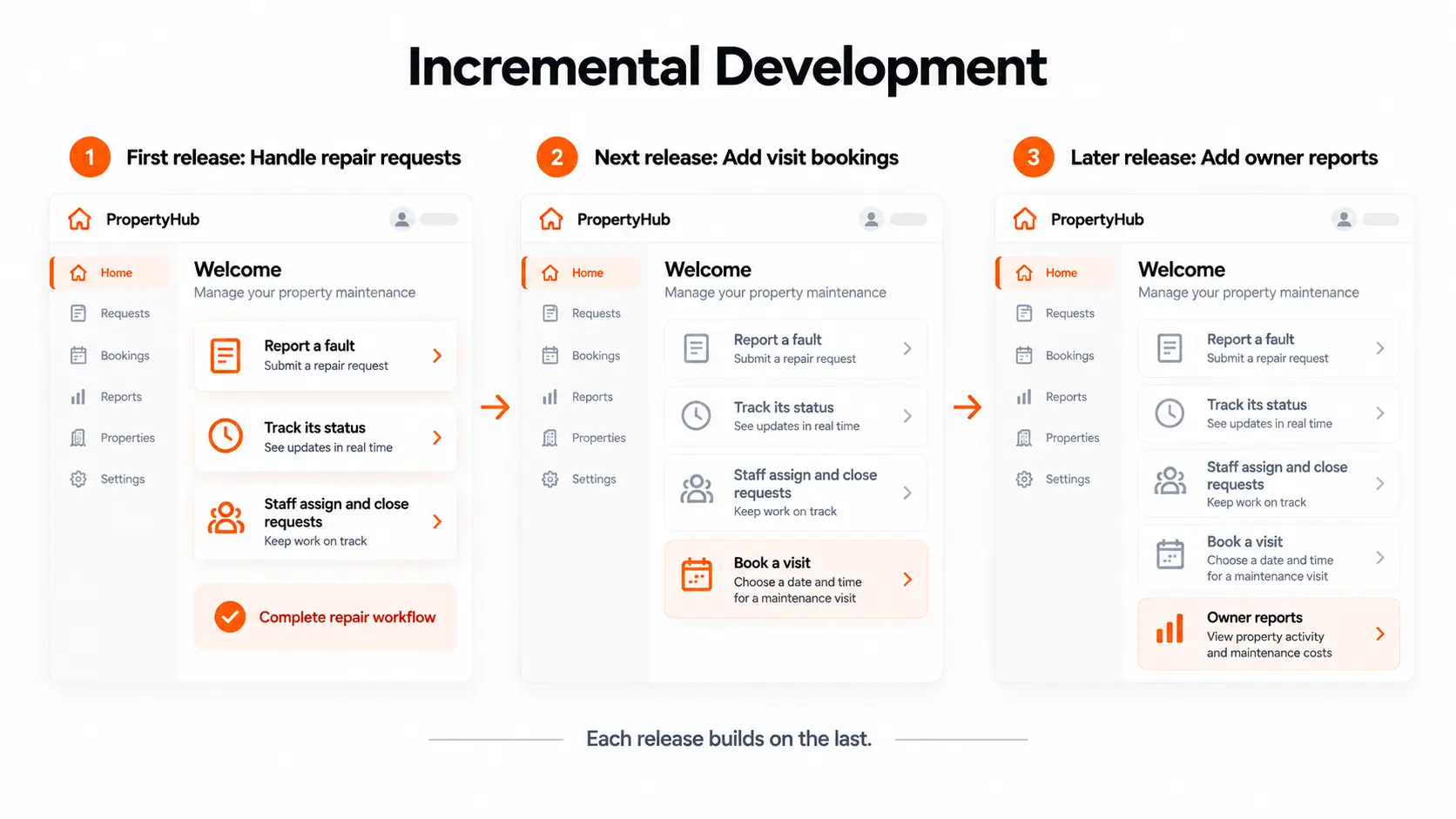
Incremental development adds working parts to a product over time. Each part brings a new ability, such as booking a visit or sending a report.
This can support staged releases. The team still decides when a build is safe and useful enough for users.
How It Works
The team chooses a small set of features that solve a real problem. It builds and tests them as a whole, then adds more.
Shared parts still need planning. User accounts, access rules, and data may support many later features. Early choices should leave room for those needs.
Where It Fits
Take a portal for a property firm. Its first release could let a tenant report a fault and see its status. Staff can receive, assign, and close the request.
Later releases could add visit bookings and owner reports. The first release already solves a task from start to finish.
Strengths and Limits
The business can put a smaller product into use and learn where to spend next. It also gets clear points to review the work.
The challenge is deciding where to split the features. A payment screen may need customer records and links to a payment service first.
Ask what each release lets a user finish. Also check how the team will ensure new parts do not break existing ones.
4. Iterative Development: Learn From Each Version
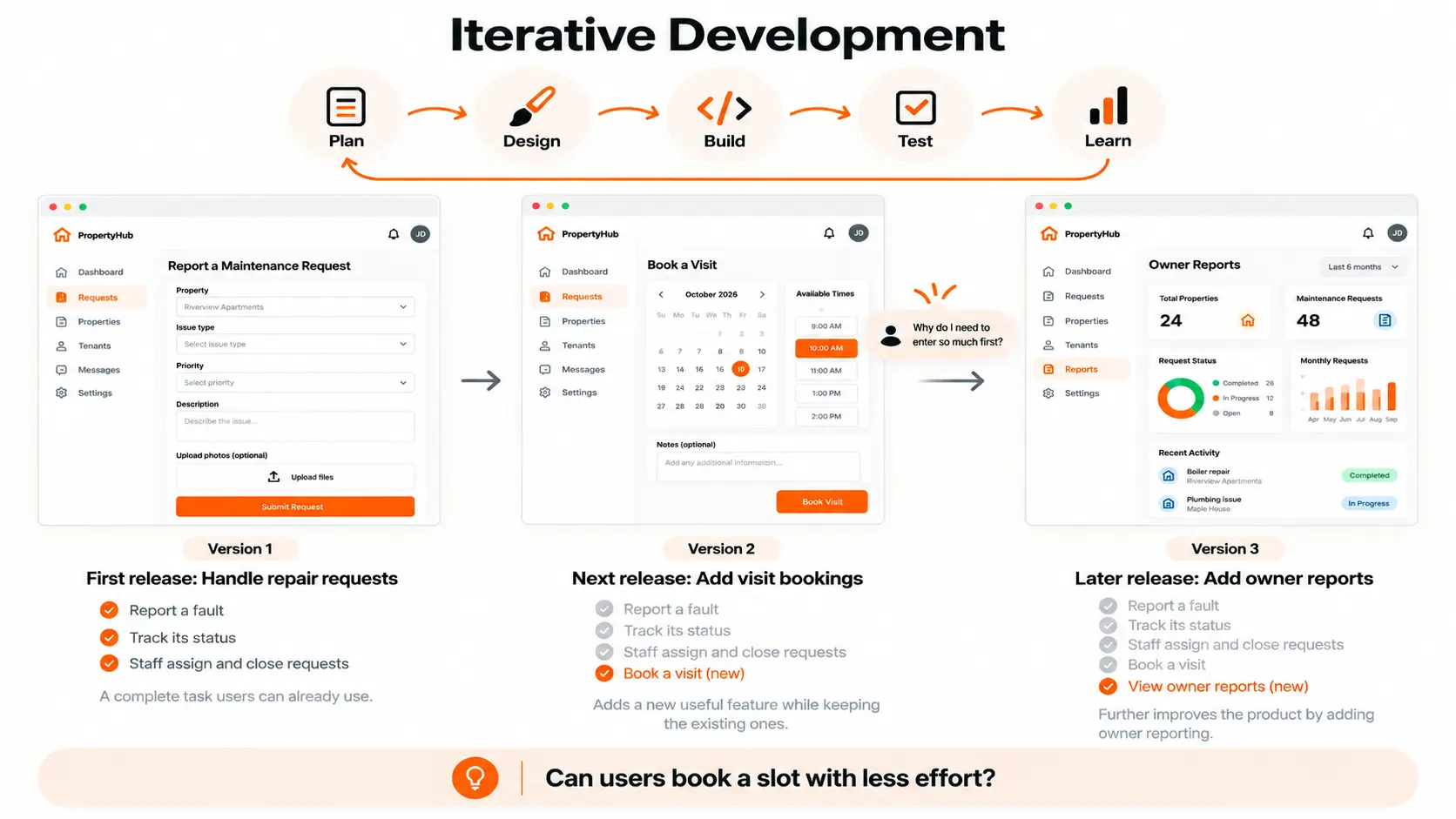
Iterative development improves work through repeated rounds. The team creates a version, checks it, learns from the result, and makes a change.
It differs from incremental work: one refines what exists, while the other adds capability. A project can use both, as Agile Alliance explains.
How It Works
Each round starts with a question. Perhaps users cannot find a report. The team designs a change and checks whether it helps.
Evidence may come from user sessions, support requests or product data. The next step follows what the team learns.
This gives each round a purpose. Without one, a team may keep changing screens without making tasks easier.
Where It Fits
Suppose people leave a booking app before choosing a time. The team tests a clearer calendar, but users still get stuck.
A user session then shows that the app asks for too many details first. The next version changes that step. Feedback helps the team find the real problem.
Strengths and Limits
This approach suits new ideas and unclear user needs. People can often explain a problem better after trying something.
It needs limits, too. Agree on what the team wants to learn, how it will check the result and how much time the round gets.
For an MVP, list the main assumptions before building. Use early versions to test them rather than adding every suggested feature.
5. Spiral: Check the Biggest Risks First
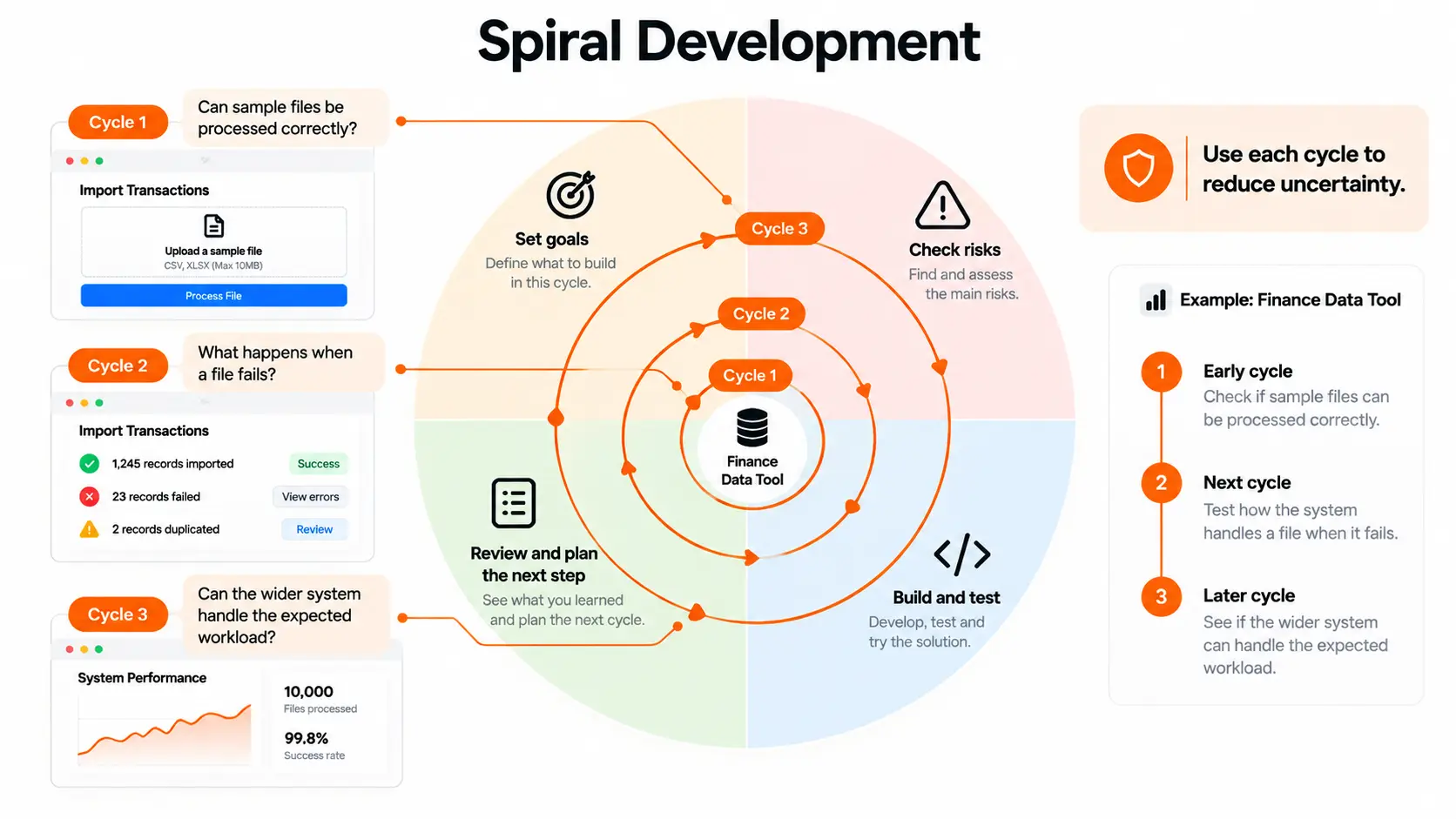
Spiral uses repeated cycles to reduce risk. The team sets goals, looks at possible problems, tests options, and reviews what should happen next.
The next step depends on the risk. It might be a prototype or a test of one technical part.
How It Works
The team asks what could stop the project from meeting its goals. It then chooses a practical way to examine that risk before spending more.
The findings guide the next decision. The team may keep the plan, change the design or stop an idea that is not workable.
Where It Fits
Suppose a finance firm needs to process large daily data files. The biggest unknown is whether a new system can handle them correctly and on time.
An early cycle could test sample files. Another could check what happens when a file fails. These results would guide the wider build.
Strengths and Limits
Spiral gives major unknowns a clear place in the plan. It helps the business decide what evidence it needs before the next investment.
Risk checks take time and skilled people. A vague list of worries adds little value. Each major risk needs an owner and a way to test it.
For a small, familiar project, this level of process may be too much. It is more useful when a wrong choice would be costly.
6. Scrum: Work in Short Sprints
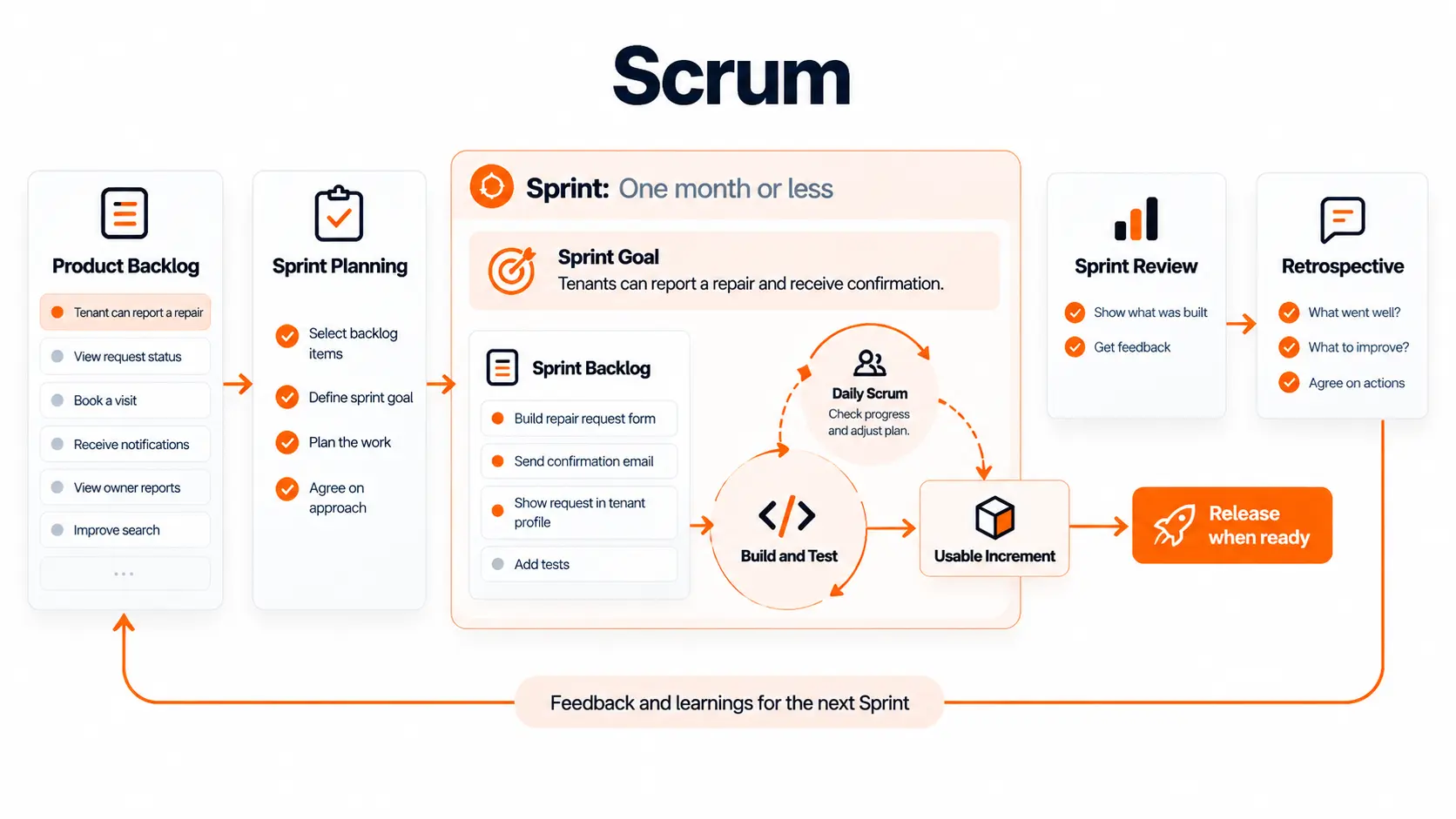
Scrum is an Agile framework. It helps a team work towards a goal, review the result, and adjust the next plan.
Work happens in Sprints of one month or less. The team includes a Product Owner, Scrum Master, and Developers. These roles are defined in the official Scrum Guide.
How It Works
The Product Owner sets the order of product work. Developers plan and build it. The Scrum Master helps the team use Scrum and improve its work.
Sprint Planning sets a goal. Daily Scrums help Developers adjust their plan. The Sprint Review looks at results with stakeholders. The Retrospective examines how the team can work better.
Plans can change without putting the Sprint Goal at risk. Usable work can also be released before the Sprint ends.
Where It Fits
For a property app, a goal could be: “Tenants can report a repair and see that staff received it.”
That gives the work a shared purpose. A form, photo upload and staff view all serve the same task. It is clearer than a goal to finish six screens.
Strengths and Limits
Scrum gives an MVP or SaaS team regular points to review progress. It needs people who can answer questions and decide priorities.
Waiting days for a key answer will still delay work. Plan time for those decisions.
Also include real user feedback. A review with business stakeholders does not replace testing the product with its intended users.
7. Kanban: Help Workflow
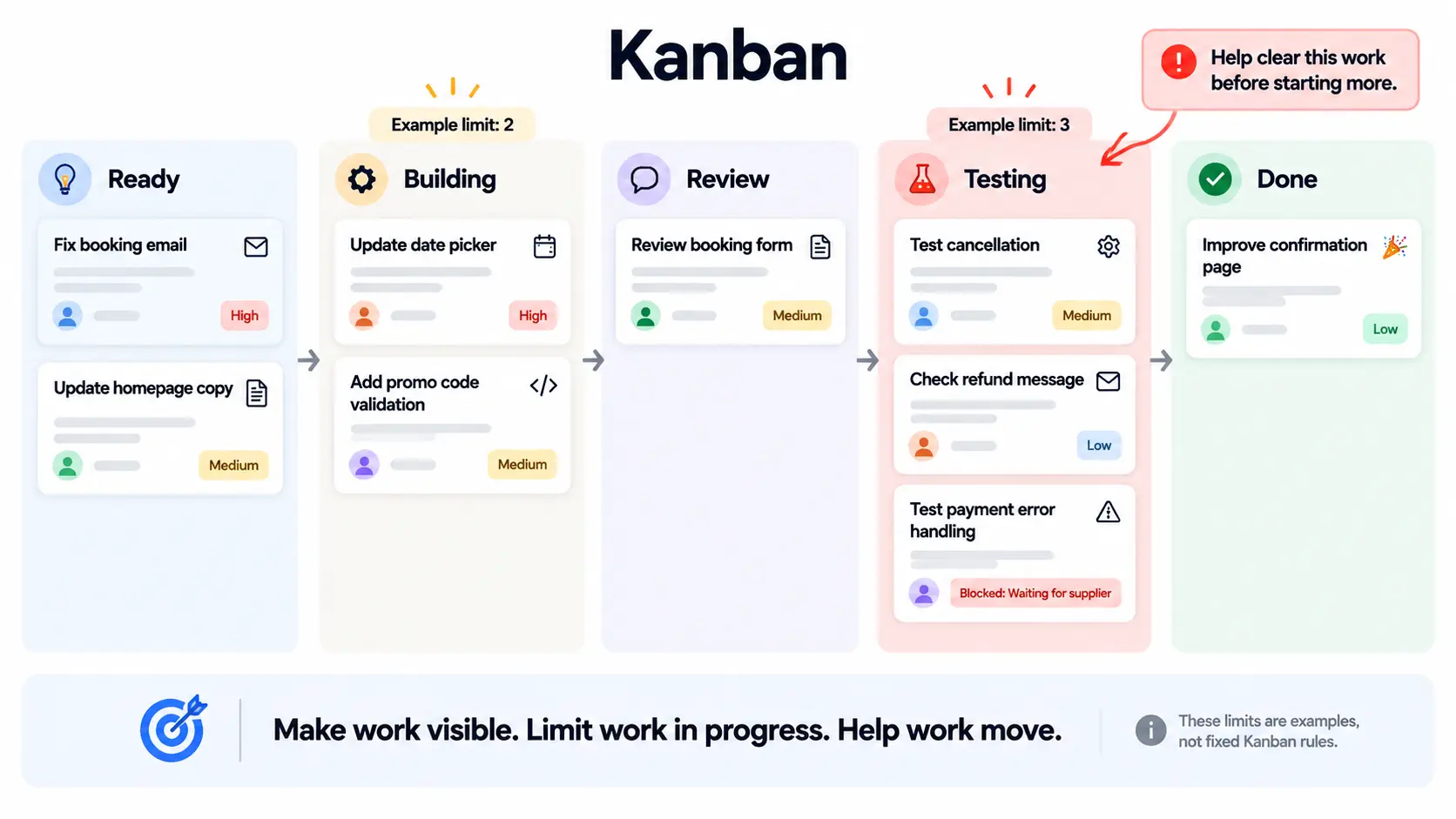
Kanban makes work visible and helps teams control how much is unfinished. A board shows where tasks are, while shared rules guide how they move.
It can support both new product work and ongoing updates.
How It Works
A board might show Ready, Building, Review, Testing, and Done. The team controls the number of tasks in progress.
If testing is full, starting more tasks may lengthen the queue. Helping finish existing work may be the better choice.
Measures such as task age and completion time help the team spot delays. The goal is to use that information to improve the flow.
Where It Fits
Picture a team supporting a live booking app. Work includes failed alerts, small screen changes, and new payment options.
The team agrees on how to handle urgent faults and who sets other priorities. A task waiting on a supplier shows that block clearly. People can then act on the delay.
Strengths and Limits
Kanban can suit work that arrives at uneven times. Teams can review their current process and make changes as needed.
A tidy board alone is not enough. Vague tasks and constant “urgent” requests will still cause problems.
For new products, keep a clear product goal and release plan alongside the board. For support, agree which issues should move ahead of normal work.
8. DevOps: Build, Release and Run Software Together
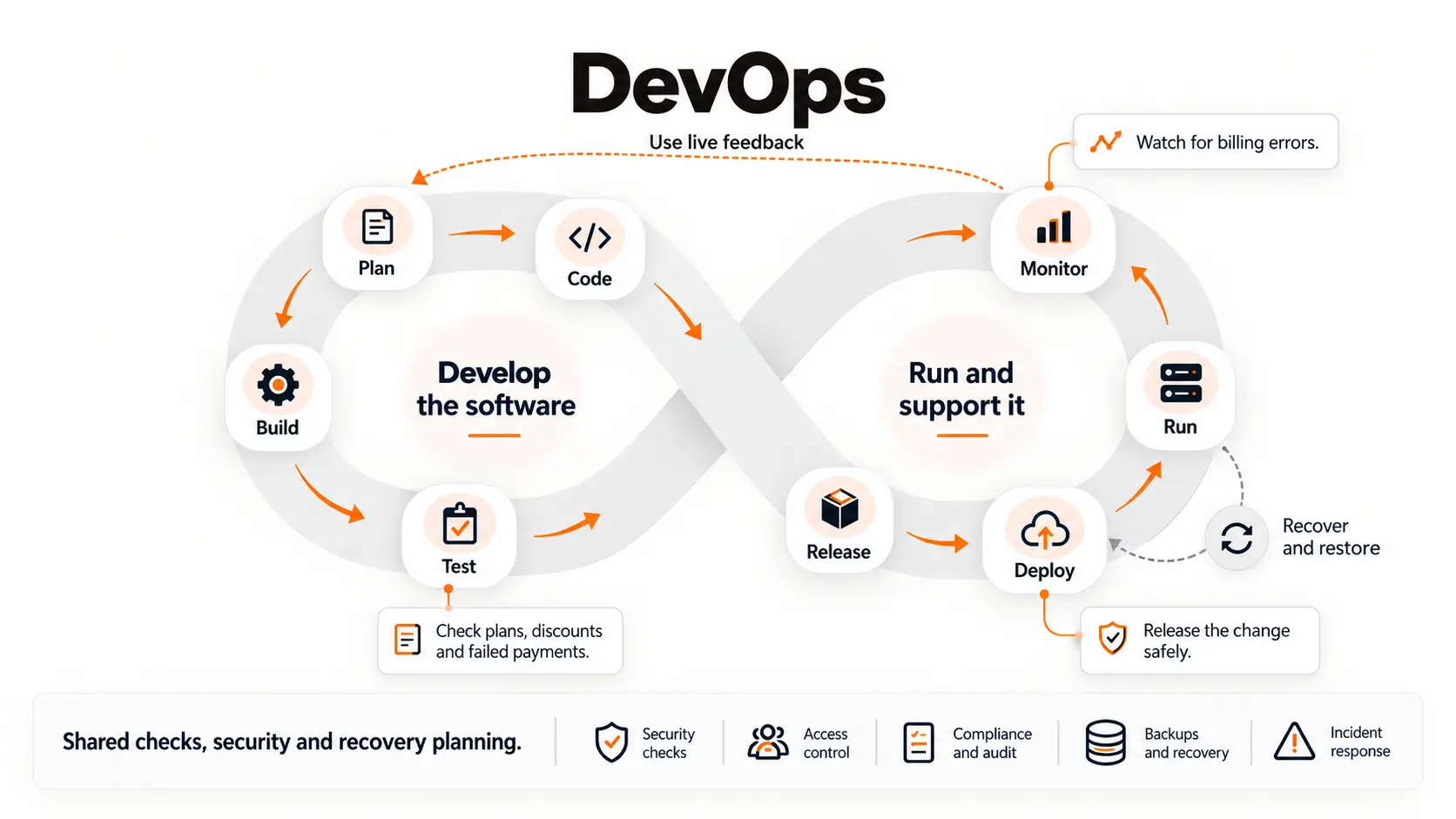
DevOps connects software development with the work needed to keep it running. It can support Scrum, Kanban, or another delivery process.
How It Works
The team creates a repeatable path from a code change to a tested release. Automated tests check known risks. A test environment lets people try changes before users get them.
After release, monitoring helps spot faults. The team also needs a plan to restore service if an update goes wrong.
Where It Fits
Imagine a SaaS app changing how it works out monthly bills. The team needs to check plans, discounts, old account data, and failed payments.
After launch, it should watch for errors. Someone must know who will respond and how to recover. A fast release needs those checks around it.
Strengths and Limits
DevOps can reduce manual steps and make releases more consistent. It brings support needs into the build process.
Tools need upkeep. Tests can become out of date, and too many alerts can hide a real problem.
A small app may need a simple setup: code review, key tests, a test environment, and a clear release process. Choose the effort based on the risk of a failed change.
Which SDLC Methodology Fits Your Project?
Start with your needs and risks. These questions help turn a list of methods into a practical choice.
Are the Needs Clear?
Stable rules may suit a staged plan. An untested idea needs room for feedback. List what you know and what you are assuming before choosing the process.
What Must the First Release Do?
Write down the task users must finish. For a tenant portal, it might be reporting a fault and tracking it. Incremental delivery can help when a smaller release provides real use.
What Could Go Wrong?
A broken filter and a duplicate payment have different effects. Give the highest risks more testing and review. Spiral may help with major unknowns; V-Model test planning may help where evidence matters.
Who Can Make Decisions?
Name someone who can settle business rules and priorities. Make time for user feedback too. A process that needs regular answers will struggle if nobody can give them.
What Are Your Firm Limits?
If the launch date is fixed, agree on what can wait. If every feature is essential, check whether the budget and date allow them all. A method cannot remove those trade-offs.
What Happens After Launch?
Agree who owns support, updates, and releases. Kanban may help manage incoming work. DevOps practices can support repeatable releases. Also check who will hold the code, access details, and key documents.
Can You Combine SDLC Methodologies?
Yes. One project can use several approaches for different needs.
A property portal team might first agree on access rules and links to existing systems. It could then use Scrum to build useful parts and improve them with feedback. After launch, Kanban could help manage support requests. DevOps practices could support releases throughout.
Keep the Shared Rules Clear
Agree who sets priorities, what must be tested, and who can approve a release. These rules should still make sense when the work moves between teams or stages.
Avoid competing task lists. If a Sprint plan and support queue both need the same people, agree how urgent work will be handled. Combining methods should help the team make decisions and finish useful work.
How Brightin Supports Your Digital Product
Brightin Studio brings product planning, UI/UX design, and development together. Our design and development services cover websites, web and mobile MVPs, apps and product interfaces.
For an early idea, the next step may be choosing the first useful features. For a live product, it may be finding where a task becomes hard before changing the code.
Our selected product work includes property platforms, a banking app, and a fintech dashboard. You can explore the portfolio to see the types of products we work on.
Bring your main user task, current problem, and firm limits to the first discussion. These help shape a useful project plan.
Frequently Asked Questions
What Are the Main SDLC Methodologies?
They include Waterfall, V-Model, Incremental, Iterative, and Spiral. Teams also use Scrum and Kanban to organise work, with DevOps practices to support releases and operations.
Is Agile an SDLC Methodology?
Agile is a set of values and principles. Frameworks such as Scrum put those ideas into practice through regular delivery, review, and changes to the plan.
How Do Scrum and Kanban Differ?
Scrum uses Sprints with goals and defined events. Kanban manages workflow and unfinished tasks. Both can support product development and can be used together.
Which Method Is Best for an MVP?
Iterative and incremental work can help a team learn and launch a useful first version. Scrum is one way to organise it. The right choice depends on the project.
Which Method Suits Fintech Software?
Choose based on the product’s risks, rules, and test needs. Short build cycles can work alongside formal checks. No method alone makes a product secure or compliant.
Can You Change Methods During a Project?
Yes. Agree on why the change is needed and how work will be managed. Keep useful records, quality checks, and clear responsibilities as the team changes its process.