.svg)


Every business owner wonders about how much does custom software development costs? Most projects cost between $25,000 and $250,000 or more. A simple tool for one business task may sit at the lower end. A large platform with many users, payments, data, and outside tools can cost much more.
The final price depends on what the software needs to do. It also depends on the number of screens, user types, integrations, security needs, and the team building it.
This guide gives you a clear way to think about custom software cost. You will see common price ranges, what raises the price, what hidden costs to plan for, and how to avoid paying for features you do not need.
Note: All prices below are planning ranges in US dollars. They are not fixed quotes. A real quote needs a clear project scope.
Custom Software Development Pricing- The Direct Short Answer
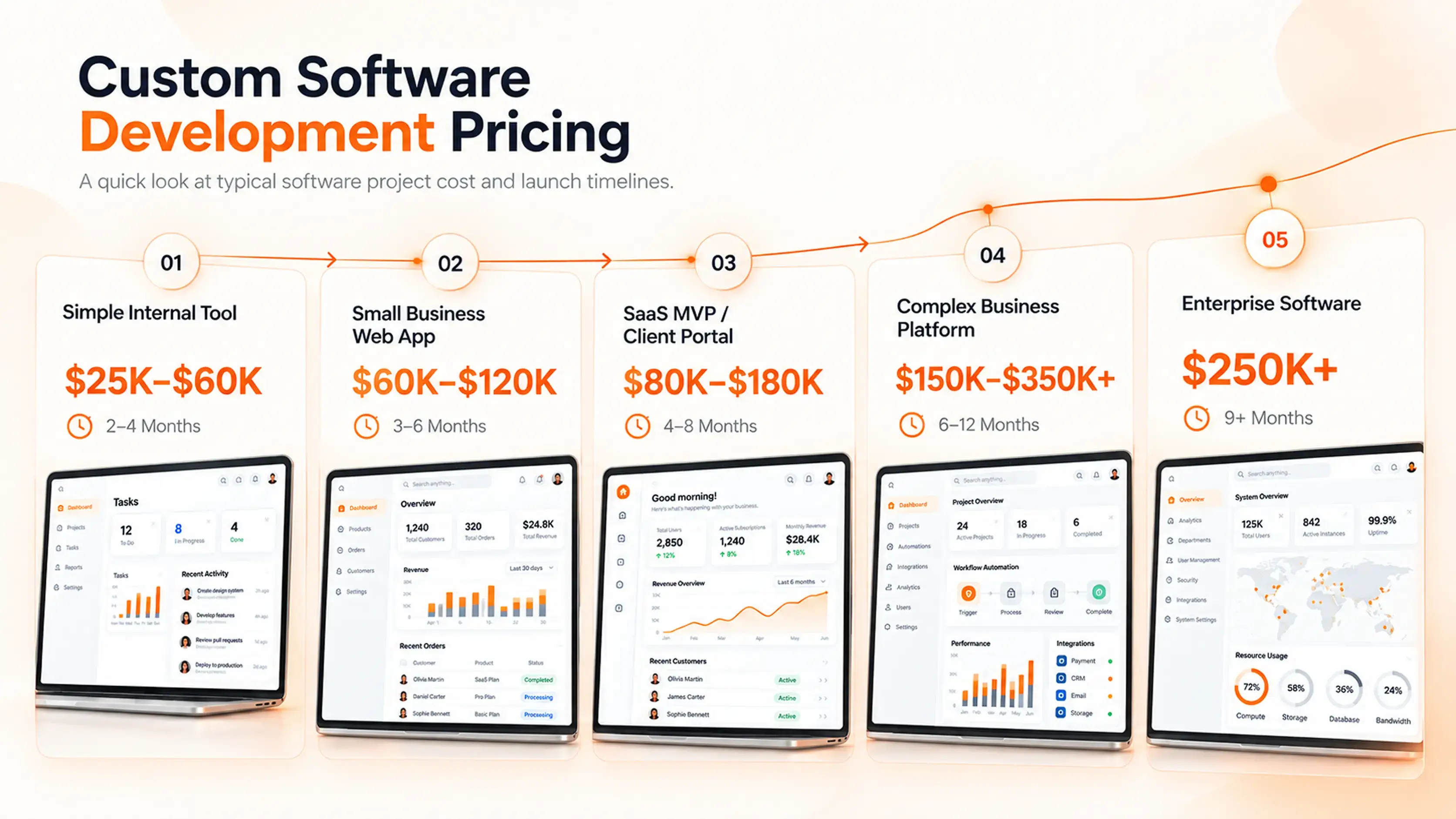
Custom software does not have one set price. A simple internal tool and a large enterprise platform are both called “custom software,” but they need very different amounts of work.
Here is a useful starting point:
A lower-cost project usually has one main job, fewer screens, and few outside tools. A higher-cost product often has many user roles, custom rules, large data sets, payment flows, reports, and stronger security.
The best way to control cost is to start with the most important problem. Build that first. Add more only after real users show what they need.
What Can You Build at Each Budget?
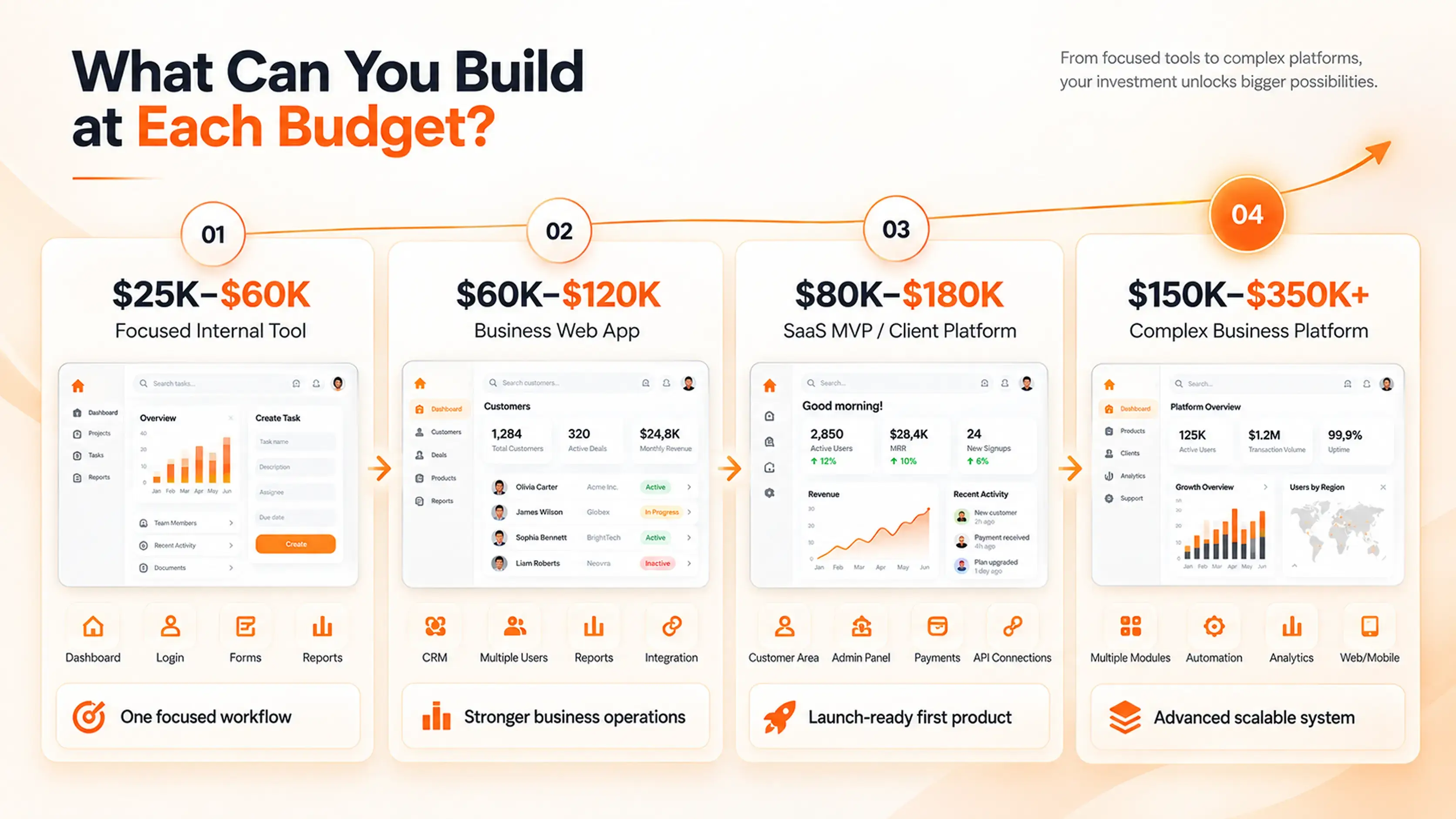
A price range is more useful when you know what it can include. These examples can help you plan a realistic first version.
What Can a $25,000–$60,000 Budget Build?
This range can work for a focused internal tool or a simple customer portal. It may help a team replace spreadsheets, track jobs, manage bookings, or store client details in one place.
A first version may include:
- User login
- One or two user roles
- A basic dashboard
- Forms and simple workflows
- Search and filters
- Basic reports
- A responsive web layout
At this level, keep the goal clear. For example: “Help staff manage service requests in one place.” Do not try to build a full business system at once.
What Can a $60,000–$120,000 Budget Build?
This range can support a stronger business app with more features. It may work well for a custom CRM, operations dashboard, booking platform, property management tool, or client portal.
It may include:
- Several user roles
- Custom dashboards
- Approval steps
- Email alerts
- Better reporting
- One or two integrations
- A more complete UI/UX design
- Testing across common devices and browsers
This budget can also fit a good MVP when the product has a clear first use case.
What Can a $80,000–$180,000 Budget Build?
This range can support a more complete SaaS MVP or customer-facing platform. The product may have accounts, payments, admin tools, reports, and more detailed business rules.
It may include:
- Customer and admin areas
- Subscription or payment setup
- Better permissions
- More custom workflows
- API integrations
- Data import tools
- Product analytics
- A scalable web app setup
The key word here is MVP. It should still focus on the first useful version, not every idea on the roadmap.
What Can a $150,000–$350,000+ Budget Build?
This range often fits a complex business platform. It may have many user types, deeper automation, advanced reporting, several integrations, and larger data needs.
Examples include:
- Multi-location operations software
- Complex property management platforms
- Fintech dashboards
- Large client portals
- Marketplace platforms
- Software with web and mobile experiences
These projects need more planning because small changes can affect many parts of the system.
What Does Enterprise Software Cost?
Enterprise software often starts at $250,000 and can go far higher. These systems may serve large teams, many locations, or a high number of users.
They may need:
- Advanced user permissions
- Audit logs
- Data migration
- Custom reports
- High security
- Compliance checks
- Many integrations
- Large-scale hosting
- Ongoing support
A large system should usually be built in phases. This helps the business lower risk and learn before spending on every feature.
What Changes the Cost of Custom Software Development?
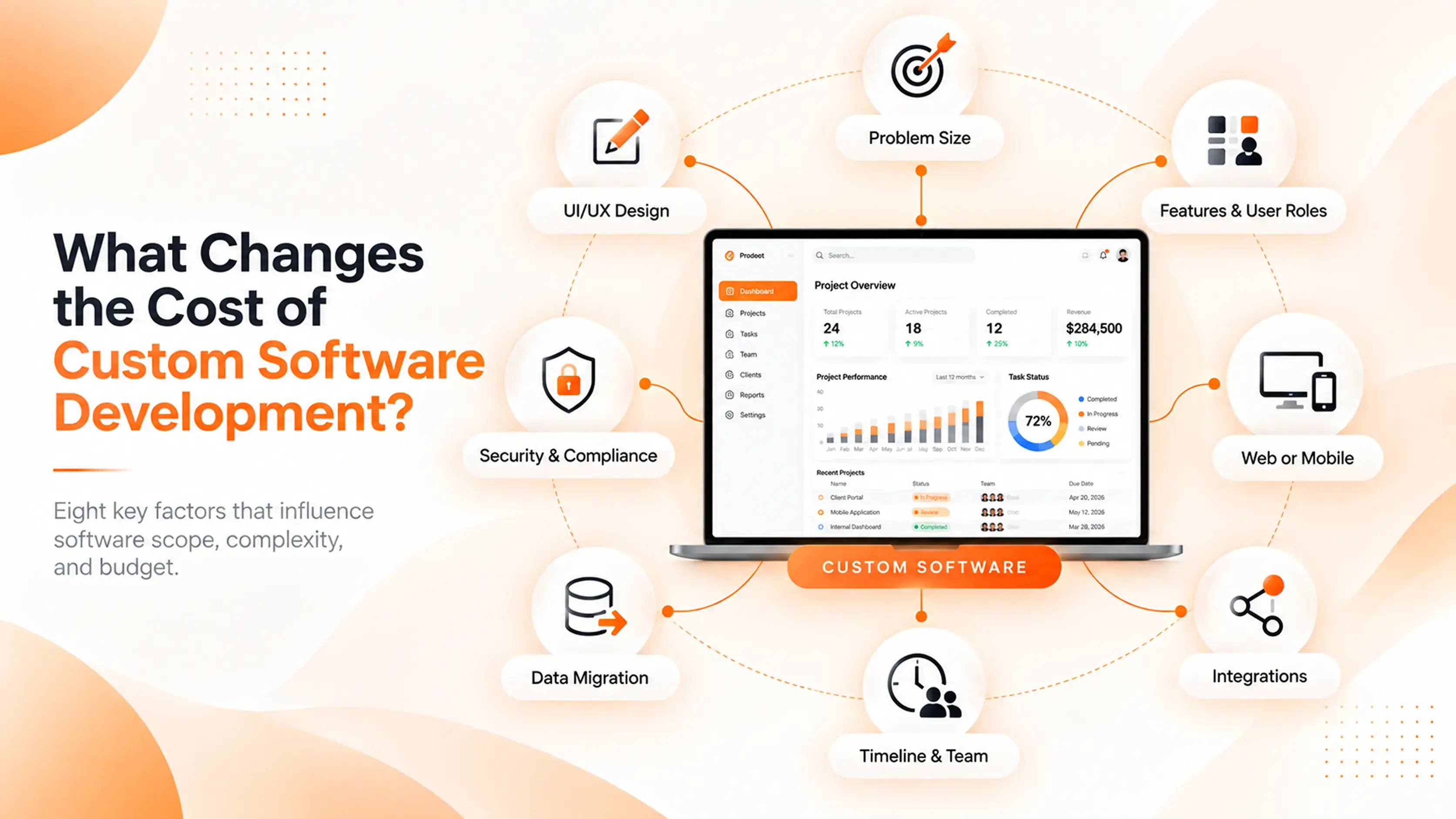
The answer to “how much does custom software development cost” comes down to the work behind the product. Here are the biggest cost factors.
1. The Size of the Problem
Software that solves one clear task costs less than software that runs many parts of a business.
For example, a simple tool that lets staff log service requests is much smaller than a platform that manages clients, staff, invoices, reports, payments, and data across many locations.
Start by writing down the one problem that matters most. That is usually the right place to begin.
2. Features and User Roles
Each feature takes time to plan, design, build, and test. More user roles also mean more work.
A platform may have:
- Customers
- Staff members
- Managers
- Admin users
- Partners
- Support teams
Each person may need different access. Each action may need rules. That is why a “simple dashboard” can become more complex than it first appears.
3. Web App, Mobile App, or Both
A responsive web app works well for many business needs. It can be opened on a phone, tablet, or computer through a browser.
A separate mobile app may be useful when people need phone features, such as camera access, location, push alerts, or offline use. Building for both iPhone and Android can add cost, so it should solve a real user need.
4. UI/UX Design
Good UI and UX design helps people use software with less effort. It is not only about colors and buttons. It is about making each task clear.
Design work may include:
- User flows
- Wireframes
- Page layouts
- Forms
- Dashboards
- Error messages
- Design rules for the product
A product with many screens, user types, and actions needs more design time. Strong design early can reduce confusion and rework later.
5. Integrations With Other Tools
Many businesses need software to connect with tools they already use.
Common examples include:
- Payment systems
- CRM tools
- Accounting software
- Email platforms
- Maps
- SMS tools
- Calendar tools
- Inventory systems
An integration may look small from the outside. But it needs setup, testing, error handling, and future care. If an outside tool changes its system, the connection may need updates too.
6. Existing Data and Data Migration
You may already have customer details, orders, property records, or reports in spreadsheets or old software.
Moving that data into a new system takes work. The data may need cleaning first. Duplicate records, missing details, and old formats can slow the project down.
A good plan answers these questions early:
- What data needs to move?
- What data can stay behind?
- Who checks the data?
- How will the new system handle old records?
7. Security, Privacy, and Compliance
Some software holds simple business data. Other products handle payments, personal details, health data, or financial records.
More sensitive data may need stronger security measures, such as:
- Better access controls
- Secure login steps
- Activity logs
- Backups
- Data protection rules
- Security testing
Security should be planned from the start. Adding it late can cost more and create problems.
8. Timeline and Team Setup
A rushed timeline can increase cost. A larger team may help with some tasks, but it also needs more planning and clear communication.
A good custom software team may include:
- Product planner
- UI/UX designer
- Front-end developer
- Back-end developer
- QA tester
- Project manager
The right team depends on the project. A small, focused tool does not need the same setup as a large platform.
How the Budget Is Usually Used
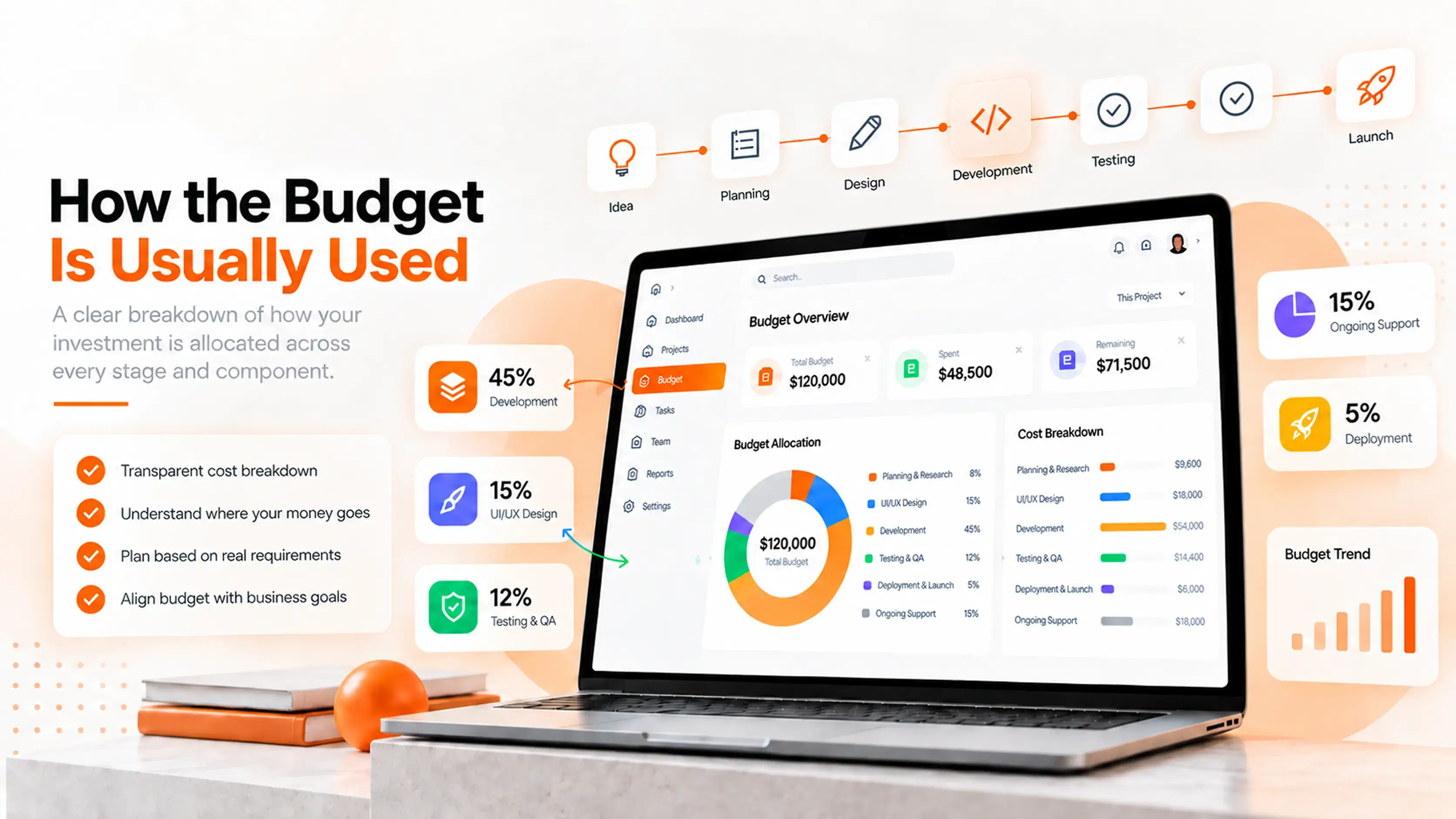
A software budget covers more than coding. A healthy project has several important stages.
Skipping discovery may look cheaper at first. But unclear work often creates more changes later. That can make the project slower and more expensive.
Costs That Are Easy to Miss
The first build cost is important, but it is not the only cost. Ask about these items before you start.
Hosting and Cloud Services
Most web apps need hosting, a database, file storage, backups, and monitoring. These are often monthly costs.
Third-Party Tool Fees
Payment tools, maps, email services, SMS tools, AI tools, and other platforms may charge by month or by use.
Ongoing Maintenance
Software needs care after launch. Browsers change. Security updates come out. Outside tools update their systems. Users also find small issues that need fixing.
Ask what support is included after launch and what future support may cost.
New Features
Your first version should not be your final version. Once people use the software, you will learn what helps them most. Plan a future budget for useful updates.
Team Training
New software only works when people know how to use it. Your team may need guides, training, and time to change old habits.
How to Lower Software Cost Without Hurting the Product
Lower cost should not mean cutting the parts that make the product useful. It means choosing the right first version.
Start With One Important Job
Pick the biggest pain point. It may be slow booking, messy customer data, missed follow-ups, or manual reports.
Build the first version around that job.
Build an MVP First
An MVP is the smallest useful version of a product. It lets real users test the idea before you spend on every future feature.
A good MVP is not a poor product. It is a focused product.
Put “Nice to Have” Features in Phase Two
Write down every feature idea. Then mark each one as:
- Must have for launch
- Helpful but can wait
- Future idea
This simple step can protect your budget.
Use Trusted Tools When They Fit
You do not need to build every part from scratch. It may be smarter to connect an existing payment tool, map service, email platform, or calendar tool.
Custom work should focus on what makes your business different.
Make Key Decisions Early
Changing the core user flow, user roles, or main features late in the project can add time and cost. Clear early decisions help the team build with confidence.
When Custom Software May Not Be the Best Choice
Custom software is not always the right answer.
An existing tool may be better if it already solves your problem well, your process changes often, or you only need a few basic features.
You may not need custom software yet if:
- A simple tool already fits your work
- Your team has not agreed on the process
- You do not have time to manage the product after launch
- The problem is small and short-term
- Your budget only covers a feature list, not testing and support
Custom software makes more sense when your business has a unique workflow, needs several tools to work together, or has outgrown spreadsheets and generic software.
Fixed Price vs. Time and Materials
There are different ways to pay for custom software development.
Fixed Price
A fixed-price project has a set cost for a defined scope. It works best when the features, timeline, and requirements are clear.
It can be a good fit for a focused MVP or a small internal tool.
Time and Materials
With time and materials, you pay for the work completed. This can work well when the product needs testing, research, or changes based on user feedback.
It gives more room to learn, but it needs a clear budget limit and regular updates.
A Phased Plan
For many businesses, a phased plan is the safest choice:
- Discovery and planning
- Build the first useful version
- Launch and learn
- Add the next features
This approach helps you spend based on real needs instead of guesses.
A Simple Checklist for a Better Software Estimate
Before asking for a quote, prepare these details:
- What business problem do you want to solve?
- Who will use the software?
- What is the main task users need to complete?
- What features must be in the first version?
- What can wait until later?
- Does the software need to connect with other tools?
- Do you need to move old data?
- When do you want to launch?
- What budget range are you considering?
You do not need a perfect plan. But the clearer your answers are, the more useful your estimate will be.
Frequently Asked Questions
How much does custom software development cost for a small business?
A focused custom software project for a small business may cost around $25,000 to $60,000. This may cover one main workflow, a simple dashboard, user login, and basic reports. More features, integrations, or user roles can raise the price.
Why is custom software so expensive?
Custom software is made for one business need. The team must plan the product, design the screens, write the code, test the features, set up hosting, and support the launch. The cost reflects the work needed to build something that fits your process.
How long does it take to build custom software?
A focused MVP may take two to four months. A more complete web app can take three to six months. Larger platforms may take six months or more. The timeline depends on the scope, number of features, integrations, and feedback speed.
Is custom software cheaper than off-the-shelf software?
Off-the-shelf software is usually cheaper at the start. But custom software can be a better long-term fit when a business has special workflows, needs better control, or must connect several tools. The best choice depends on the problem you need to solve.
Can I build custom software in phases?
Yes. In fact, this is often the better approach. Start with the most important workflow, launch it, learn from users, and add more features later. This can reduce risk and help you spend money where it matters most.
Does AI reduce custom software development cost?
AI tools can speed up some repeat tasks, such as early research, code support, or test writing. But they do not remove the need for product planning, design, engineering review, security checks, and testing. AI can help a team work faster, but it does not replace a clear product plan.
What should be included in a software development quote?
A clear quote should show the project scope, key features, project stages, timeline, assumptions, and what is not included. It should also explain how changes will be handled after the work begins.
How much does software maintenance cost?
Maintenance depends on the size of the software, hosting needs, integrations, security updates, and number of users. Ask your development team what support is included after launch and what ongoing work may be needed.
Get a Clearer Budget for Your Software Idea
A useful software estimate starts with the problem, not a long feature list.
Tell Brightin Studio what you want to improve, who will use the product, and what the first version needs to do. We can help you shape a focused plan that fits your business goals and gives you a clearer view of the work ahead.